3 Best Laptops for Gaming and Work Under 1000 in 2026
As an Amazon Associate, this website earns from qualifying purchases.
The short answer
Let work-device rules and required apps lead. Check the HP first when 16GB fitted RAM is useful. Both Acer units supply 8GB. Call quality, fan noise and full-day runtime remain unverified here.
Start here if your work apps call for 16GB RAM and the exact software and employer rules permit this model.
Core i5-12500H; RTX 4050 Laptop GPU, 6GB
16GB DDR4-3200 fitted as two 8GB modules
512GB SSD; 15.6-inch Full HD 144Hz IPS panel
Keep in mind:Both RAM slots are occupied. HP states a 250-nit, 45% NTSC panel. Measured call quality and noise remain unknown, as does full-day runtime.
Consider this exact unit if its documented parts fit your games and daily apps, with 8GB RAM kept in the decision.
Core i5-13420H and RTX 4050 Laptop GPU
15.6-inch Full HD IPS screen, 144Hz
8GB DDR5 RAM; 512GB SSD
Keep in mind:Matching work-app tests and noise results remain unknown, as does unplugged runtime. The other Nitro V's screen and service details cannot fill those gaps.
The best laptop for gaming and work must fit the work before it earns a place on your desk. Start with the apps and any employer rules. A gaming GPU does not prove support for your tools, good call quality or a full day away from power. Those needs have to be checked on their own.
Of these three configurations, we would assess the HP first when 16GB of fitted RAM is useful to your workload. Both Acer options supply 8GB. The shortlist compares documented parts. We have not tested office tasks, games or battery life on these units.
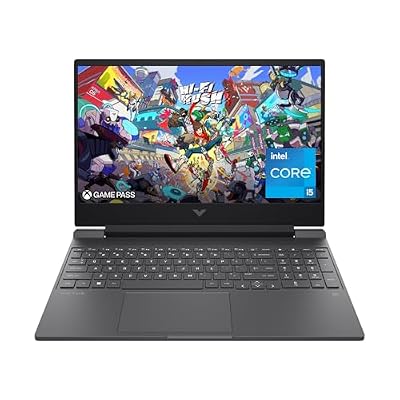
#1. HP Victus 15-fa1040nr: more RAM already fitted
Start here if your work apps call for 16GB RAM and the exact software and employer rules permit this model.
Keep in mind: Both RAM slots are occupied. HP states a 250-nit, 45% NTSC panel. Measured call quality and noise remain unknown, as does full-day runtime.
HP lists a Core i5-12500H, RTX 4050 Laptop graphics and 16GB DDR4-3200 RAM. The memory uses two 8GB modules. Its SSD is listed at 512GB. Those are fitted parts you can compare with your own software needs.
The screen is Full HD IPS at 144Hz. Read its stated brightness and color range alongside the refresh rate. The Victus review explains that exact setup. The configuration's 5.06lb laptop-only weight excludes the adapter and cables, so it is not a complete commute figure.
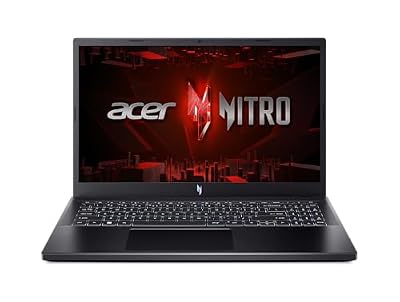
#2. Acer Nitro V ANV15-52-586Z: 165Hz, with a base-RAM limit
This Nitro V lists a Core i5-13420H and RTX 4050 Laptop GPU. Its memory is 8GB DDR5, with a 512GB SSD. The 15.6-inch Full HD IPS panel is specified at 165Hz. Keep the full model code when reading any port or service claim.
If an app or a work policy calls for more RAM, resolve that gap before ordering. A future upgrade does not describe the laptop as supplied. Check the exact parts and fitting route, then compare the whole purchase. Do not leave an essential work need to an assumed upgrade.
#3. Acer Nitro V ANV15-51-51H9: separate 144Hz configuration
Consider this exact unit if its documented parts fit your games and daily apps, with 8GB RAM kept in the decision.
Keep in mind: Matching work-app tests and noise results remain unknown, as does unplugged runtime. The other Nitro V's screen and service details cannot fill those gaps.
This Acer also names a Core i5-13420H and RTX 4050 Laptop graphics. It lists 8GB DDR5 and a 512GB SSD, with a 144Hz Full HD IPS panel. It is a different exact configuration from the 165Hz option above.
Our ANV15-51-51H9 review keeps its evidence separate. The same CPU and GPU names do not prove the two units behave alike during a long task. Seek a matching test if sustained work speed or sound levels will decide your choice.
Best laptop for gaming and work: start with the work rules
If the laptop will access an employer's systems, check the approved-device policy before you buy. Some work needs an issued device or a managed setup. The fact that your software runs on Windows does not establish permission to use a personal gaming laptop for that job.
Ask about the required OS edition and version, plus device enrollment. Check any VPN and security-tool rules. Keep the answer with the model you are comparing. A general statement that a laptop has Windows does not settle every part of the work setup.
For your own business, make a short list of the tools that must run locally. Name their current versions. Include any browser tools and their supported browsers too. Then check the vendor's requirements rather than assume all office work has a small hardware load.
Work need
Check before choosing
What this shortlist cannot prove
Employer access
Approved device, OS and management rules
Permission to connect a personal laptop
General documents and web apps
Current app and browser support
Every combined workload will feel the same
Calls from a shared room
Microphone, camera and sound evidence
Measured call quality or quiet fans
Visual work
App requirements and display standards
Accurate color from a refresh-rate label
Travel
Full carry kit and matched runtime test
A full workday from battery capacity
Desk setup
Exact ports, monitor inputs and cables
Every feature through a USB-C connector
Scroll for more →
An unverified firm need should pause the purchase. A good gaming parts list does not cancel a missing work requirement. Treat games as a second fit check once the work setup is clear.
Match the memory to the apps you use together
The HP supplies twice the RAM amount of either Acer in this shortlist. That makes it worth checking first for a workload that needs 16GB. It is a capacity fact, rather than proof of a fixed speed gain in all work apps.
Consider the apps that stay open together. A browser call alongside a large local tool is not the same task as a single blank document. Read each app's guidance and look for a test that reflects your actual mix when responsiveness is a firm concern.
Some tools publish a small minimum that only establishes a starting point. A minimum for an editor also does not cover every plug-in or project. Do not use the lightest item in your toolchain to qualify the whole workload.
The CPU guide compares the wider system. Match the exact CPU in the selected configuration with your app's needs. A Core i5 name covers different processors and cannot replace the full model identifier.
Screen space and visual work
All three selected screens are listed at Full HD. The two Acer records differ in stated refresh rate, while the HP sheet adds brightness and color-gamut figures. Those facts do not establish equal screen quality. Response time and color accuracy need their own evidence.
If your work needs a defined color standard, check it before choosing a panel. The HP's stated 45% NTSC gamut is a limit to weigh. We do not have a matched color-work result for either Acer that would justify calling it a verified alternative for that task.
For long reading sessions, assess the actual display and your desk setup when possible. A high refresh rate does not tell you whether the text size and working area suit your needs. The right layout for your work can matter more than an unused game feature.
Ports and an external screen
Check the precise port record for your selected model. HP lists a USB-C port with DisplayPort support for the 15-fa1040nr. That does not establish Thunderbolt support or charging the laptop through that socket. The exact model sheet is the source for the narrower stated features.
A dock or adapter needs its own compatibility check. Match the laptop's output with the dock and cable, then the display. Confirm the resolution and refresh rate you need across that full path. The same connector shape does not prove every link supports the desired feature.
We have not verified a named dock, spare charger or memory kit for these exact units. Treat those accessories as a separate check. Do not count a generic product suggestion as proof that your complete desk setup will work.
Calls, fans and shared spaces
A webcam listing does not establish clear calls in your room. Look for evidence of the actual camera and microphone, with lighting and background sound stated. A sample from another family variant needs an exact-part match before it can stand in for this laptop.
We have no matched fan-noise test for these units. A quiet light task and a long game may use different power and cooling behavior. Do not assume that a high-performance mode is the right setting for calls in a shared room.
If noise is a firm need, seek a test with a clear method and distance. A comment that a laptop seems quiet has little value without context. A headset may help your own listening, but it does not establish what other people in the room will hear.
Travel and unplugged work
The adapter belongs in the carry plan if you need it during the day. HP's laptop-only mass does not include that extra load. The selected Acer records do not establish comparable laptop and charger weights here. We cannot turn the available figures into a fair travel-weight ranking.
Battery capacity is a different fact from runtime. A maker's maximum for a named light task does not promise a day of calls or local computing. We have no matching unplugged work test for these configurations, so no all-day claim belongs in the choice.
If you often work away from power, specify the actual task and the time you need. Use a matched test to assess that need. Check gaming on battery separately; an office-use result cannot establish game speed or runtime without the adapter.
Keep work files and game storage in the plan
Each listed SSD is 512GB. That is not the free space left after Windows and apps are installed. Your work files and local game library need their own room. Updates can change the space you need, so check actual free capacity rather than count only the drive label.
Follow your employer's rules for storing work data. Personal games and a work login can share hardware without sharing the same permissions or backup needs. A separate folder alone is not proof of a compliant work setup.
For your own files, use a backup method you can restore from. Extra SSD capacity does not provide a separate copy by itself. Test access to an important restored file before you rely on the process. Keep account access and recovery details within your chosen security plan.
Factors to consider
Confirm that a personal laptop is allowed for your work.
Name the apps, versions and OS requirements.
Match fitted RAM to the tasks you run together.
Resolve screen and desk-connection needs.
Seek evidence for calls and fan noise where they matter.
Assess the complete carry kit and actual unplugged task.
Check your games after the firm work needs are met.
FAQ
Can a gaming laptop replace a work laptop?
Only if it fits the work tools and any device policy. A dedicated GPU does not prove that fit. Check the exact model and employer rules before buying, then assess the screen and other daily needs.
Does more RAM make every work app faster?
No. The amount matters when the workload needs it, but it is not a fixed speed score. Compare the supplied capacity with the apps you use together. The HP has 16GB; both Acer options have 8GB.
Can I assume USB-C will power my whole desk?
No. Check the documented features of the exact port and every device in the path. A connector shape does not establish display modes, data speed or laptop charging. Verify a named dock before relying on it.
Best laptop for gaming and work: how we picked and verdict
We checked exact catalog identities and new US offers below this site's ceiling. The HP model sheet supplies its fitted parts and ports, plus the panel limits. The Acer records identify separate full model codes. These documents are not our own work-app or game tests. They do not establish our own battery results either.
For the best laptop for gaming and work, let the firm work rules lead. Assess the HP first if its fitted 16GB RAM suits the apps you need. Both Acer units call for more care around base memory. Keep screen and travel evidence in view. Read the main buying guide for the whole purchase, or use contact and corrections for a factual mismatch.