As an Amazon Associate, this website earns from qualifying purchases.
The short answer
Check the 15-fa1040nr if you want RTX 4050 graphics and 16GB of RAM already fitted. Both memory slots are occupied, and the panel's stated color range is modest. We have no hands-on game or battery result.
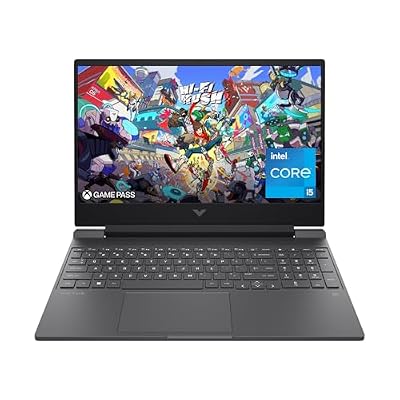
The HP Victus 15 assessed here is the 15-fa1040nr, product number 8E9L6UA#ABA. Its useful starting point is a factory list that names both memory modules. You get a Core i5-12500H, an RTX 4050 Laptop GPU, 16GB of DDR4 RAM and a 512GB SSD. You do not need to guess whether a larger memory option in the same listing is included.
This review uses specifications and published evidence. We have not used or tested this laptop. HP's exact model sheet supplies the facts below. Its lab battery claims do not promise a result for your day. The panel's stated refresh rate does not prove game speed either.
The HP Victus 15-fa1040nr suits a buyer who wants its listed GPU without making a RAM upgrade the first task. The screen is the main compromise to weigh. HP's sheet gives it a 144Hz refresh rate, but also a modest brightness and color specification. A fast refresh badge does not erase those limits.
Skip it if your main need is a measured wide-color panel, a light travel kit or proven unplugged gaming time. None is established by this assessment. You may still use it for school or work, but first check the apps, power access and display needs that matter to that task.
Strengths and limits
Useful fact
Buying trade-off
16GB of DDR4-3200 memory, fitted as 2 x 8GB
Both accessible memory slots are in use
RTX 4050 Laptop GPU with 6GB of dedicated GDDR6
Exact GPU power and measured game speed remain unconfirmed here
15.6-inch Full HD IPS panel at 144Hz
HP specifies 250 nits and 45% NTSC, not a measured wide-color result
USB-C with DisplayPort 1.4, HDMI 2.1 and Ethernet
The USB-C data rate is listed as 5Gbps; do not assume Thunderbolt
A 70Wh battery and supplied 200W adapter
Stored energy and adapter rating do not establish runtime
Scroll for more →
Identify this HP Victus 15 before comparing it
Victus 15 is a family name. HP sells different processors, GPUs, panels and memory types within that family. The full 15-fa1040nr code and 8E9L6UA#ABA product number keep this page tied to one factory configuration. A similar case or color is not enough.
Read the selected option on the merchant page. It should agree with the model code and installed parts. If the seller describes an upgrade, find out which parts changed and who performed the work. A modified bundle needs its own terms and exact specification.
Do not transfer a fact from a Ryzen-based 15-fb model just because both laptops say Victus 15. The processor platform and service record can differ. Our Victus RAM guide shows why a family-wide capacity claim is risky. The model in this review uses DDR4; a DDR5 claim from another Victus does not apply.
Keep the full code when asking HP or a seller a question. Ask about the model and selected option, rather than whether Victus laptops have a feature. A clear answer names the configuration. Save that answer if it affects your purchase.
The model sheet has a 2023 revision date. That is part of its source history, rather than a claim that the laptop was redesigned for the current year. This page's check date tells you when we checked the evidence. It does not change the age of the processor or chassis.
The processor: a named part with a defined core layout
The Core i5-12500H is not the same chip as every processor with an i5 badge. Intel's own processor record identifies it as a 12th-generation mobile part. Its layout has four performance cores and eight efficient cores, for twelve cores and sixteen threads.
That layout is useful context for comparing the parts list. It does not tell you how fast this complete laptop will finish a project. The app and its memory needs matter. Cooling and power settings affect the result too. We have no exact-system export or compile test to quote here.
The listed maximum turbo speed is a limit the processor may reach under suitable conditions. It is not a constant speed in every game or while all cores are busy. Do not compare two laptops by their largest GHz number alone.
For a mixed gaming and study setup, write down the non-game apps first. A course may require a particular Windows app, enough working memory or a suitable GPU. Check those needs before treating a CPU tier as the answer. The badge cannot resolve software support on its own.
If you find a review, check that it tested the same processor and GPU together. A Victus with a different i7 or Ryzen chip is useful background about that tested machine. It cannot supply this model's game-speed or noise result. Its battery result belongs to that tested laptop too.
Graphics: keep the laptop GPU and its power separate
HP lists the RTX 4050 Laptop GPU with 6GB of dedicated GDDR6 memory. That is separate from the 16GB of system RAM. A listing should not combine the two into a larger general memory figure.
The exact laptop GPU name matters when reading tests. NVIDIA's mobile comparison covers the laptop products. Results from a desktop graphics card are not evidence of this Victus's performance.
We have not established a model-specific GPU power limit from the retained HP sheet. That field stays unknown. The 200W power adapter is the supply for the whole laptop. Its rating is not the graphics chip's power limit and must not be used as one.
For your games, look for a test that records the full setup and settings. Check the preset and resolution. Note any upscaling or frame generation too. Keep those choices beside the result. A reported average without them gives you little basis to compare two machines.
Also check what RAM was installed during the test. This model includes two memory modules, but a review could have changed them. We do not attach a specific FPS benefit to that arrangement. We simply keep the tested configuration attached to the test.
This review does not promise a speed target in Fortnite, Genshin Impact or another named game. Their current requirements and your desired settings are separate inputs to the choice. A compatible graphics feature is not proof of a particular result.
The screen's trade-offs are stated clearly
HP's model sheet lists a 15.6-inch IPS screen with a 1920 x 1080 resolution and 144Hz refresh rate. It also lists a 9ms response time, 250-nit brightness and 45% NTSC color coverage. These are HP's stated specs. We have not measured them.
The brightness and color figures deserve attention if you work with images or use the laptop in bright rooms. Do not call the panel a wide-color display from the IPS label. IPS describes a panel technology, not a guarantee of a particular color range.
The response-time figure also needs its source label. It is HP's published specification. We have not measured the panel's transitions or overshoot. Nor have we checked it at different refresh rates. The sheet alone does not prove motion clarity in a fast game.
The refresh rate sets a screen capability. Your game's rendered frame rate depends on the workload and settings. A high-refresh panel can still show a game that runs at a lower frame rate. Keep those numbers separate as you compare.
If a color-critical app is part of your work, find a suitable measured display review or plan a suitable external screen. Check the full video route for that screen too. A connection label alone does not prove every resolution and refresh combination through a dock.
For a buyer who mainly uses a known external display at a desk, the built-in panel may carry less weight. For someone who uses the laptop screen for every task, it may be the deciding compromise. Make that choice before ranking minor processor differences.
Factory memory: 16GB, with both slots occupied
The exact HP sheet lists 16GB of DDR4-3200 RAM as two 8GB modules. It also lists two accessible memory slots. Those facts tell you that both slots are occupied in the factory configuration. They do not establish a higher supported capacity than HP documents for the exact model.
This is a clearer starting point than a listing that only says up to a large memory total. The selected configuration already includes the stated 16GB. You should still check the merchant's selected option and full model number before ordering.
If your task needs more memory, plan a replacement rather than assuming there is an empty slot. Read the correct service instructions and confirm the supported module type and capacity. Do not fit DDR5 because another Victus generation uses it.
A processor's maximum memory figure is a different limit from a laptop's documented support. The board, firmware and qualified configurations matter too. A user's successful upgrade may be useful research, but it is not the same evidence as HP's stated support.
Think about your full workload. A game, browser, voice chat and project files share system resources. Required memory depends on those apps and what they are doing. We do not claim that the included total suits every course or creative workload.
For a buyer whose apps fit the factory memory, this setup avoids an immediate parts change. That is its practical advantage over a lower-memory option. For a buyer who needs more, the advantage may disappear. Compare the full upgrade route before deciding.
SSD space and the storage questions still open
The factory sheet lists a 512GB PCIe Gen 4 NVMe M.2 SSD. HP notes that formatted capacity is lower and some space is reserved for preloaded content. Do not plan your files as though the full advertised total will be free after setup.
Estimate the games you keep installed at the same time. Include work files and media, with space for updates. You do not need every game in your account installed. Frequent large downloads may not suit your internet connection or schedule.
This sheet does not establish a free storage expansion slot. We leave that question open until the exact service record resolves it. An M.2 drive in the parts list is not proof of a second empty drive bay.
If you plan a drive replacement, include the time needed to move the system and files. Keep a backup before changing parts. A bigger advertised drive can be attractive, but only compare it when the actual selected laptop includes it.
Be careful with seller bundles that advertise several storage sizes in one set of features. The largest supported or offered size is not automatically what arrives. Match the selected option to the title and order details.
A useful port list, with a USB-C limit worth knowing
HP's sheet lists one USB-C port at a 5Gbps signaling rate, with DisplayPort 1.4 and HP Sleep and Charge. It also lists two 5Gbps USB-A ports, HDMI 2.1, RJ-45 Ethernet, a combined headset jack and an SD card reader. These are the ports for this model, rather than a generic Victus list.
The USB-C port is not described as Thunderbolt in this sheet. Do not assume Thunderbolt because the processor platform can support it. A processor feature does not prove that the laptop maker routed and supplied it on the port.
HP Sleep and Charge concerns charging a connected device under supported conditions. It is not proof that the laptop itself accepts all USB-C chargers. The sheet lists a separate 200W Smart AC adapter. Check input support in the exact manual before planning a smaller travel charger.
Write down your desk connections. A mouse and keyboard can use both USB-A ports. Other devices add their own needs. Check whether a hub is required and whether it carries the data or video route you want.
The wired Ethernet port is useful when your desk has a suitable network connection. Wi-Fi 6 and Bluetooth 5.3 are also listed. None guarantees a particular online-game delay or signal quality in your room. The full network path still matters.
For an external monitor, confirm both ends of the link and the cable. If a dock sits between them, include its limits too. Avoid assuming that the highest number in a port standard establishes every mode on the monitor you own.
Accessory tips
We have not confirmed a named dock or replacement RAM kit for this exact setup. Use HP's port and service records to match one before buying. The supplied adapter is the documented power source; an unknown USB-C charger should not replace it in your plan.
Carry weight and the supplied power adapter
HP lists the unpackaged laptop at 5.06 pounds. The packaged weight is a separate 7.39-pound figure. Keep those labels separate when you compare. A shipping weight should not be presented as the bare laptop's carry weight.
The adapter and cables add to what you carry. We do not have an independently checked complete-kit weight in this assessment. If you travel daily, compare the full bag load rather than the laptop figure alone.
HP gives the chassis dimensions as 14.09 inches wide, 10.04 inches deep and 0.93 inches high. Check those against your bag. A sleeve labeled for a screen diagonal may fit differently depending on its shape and padding.
At a fixed desk, the size and adapter weight may be manageable trade-offs. Travel between classes and shared desks is a different use. Decide how often you will carry the full kit before treating portability as a minor detail.
No part of this review ranks the Victus as the lightest laptop in the budget. We have not measured a complete comparable group for that claim. Its documented bare weight is a fact you can use in your own choice.
Battery claims: read the tests behind the headline
The model sheet lists a 70Wh battery. It also publishes separate maximum battery-life claims for mixed use, local video and wireless streaming. These are HP's stated tests. They are not a measured result from us or a promise that all three tasks use the same power.
HP's local-video footnote describes Full HD playback at 200 nits, with wireless on but not connected. Its streaming footnote instead describes Netflix in Microsoft Edge with wireless connected. The mixed-use claim cites MobileMark 18. Those methods should stay attached to their claims.
We do not turn those maximum figures into an all-day school verdict. A class that uses video calls, a browser and specialist software is a different workload. Screen brightness and software settings can change the result. Battery age matters too.
Nor do the video figures establish unplugged game time. A game adds a different load, and laptops may change performance modes on battery. We have no matched unplugged-gaming result for this configuration.
HP also describes fast charging under specified conditions. That is a charging claim, not a runtime claim. Its footnote uses the supplied HP adapter with the system shut down and notes that charging slows after the first stage. Do not apply that method to an unknown USB-C charger.
If time away from power is essential, decide the real task and seek a test that matches it. Our Victus 15 battery guide explains the evidence checks in more detail. Its family-level examples do not replace a test of this exact laptop.
Factors to consider before choosing the HP Victus 15
Start with the app or game you cannot compromise on. Check its current system needs and the settings you expect. Then assess this exact configuration in the order below.
Match 15-fa1040nr and 8E9L6UA#ABA to the selected offer. Resolve any seller change to memory, storage or software.
Check whether the supplied 16GB of memory fits your work. Both factory slots are occupied, so do not assume a simple empty-slot addition.
Decide whether the screen's 250-nit and 45% NTSC specifications meet your needs. Seek measured panel evidence where it matters.
Plan the files and games that must stay installed. Confirm a storage change before relying on it.
Check your actual desk devices against the port list. Do not infer Thunderbolt or USB-C input charging.
Include the adapter in a daily carry plan. Bare laptop weight is only part of the kit.
Read the seller's return and warranty terms. A factory warranty description does not establish every marketplace seller's service terms.
An unresolved requirement is a reason to get more evidence before buying. It is not a reason to replace the missing fact with a brand reputation score. The exact parts and their limits are more useful than a broad promise that a Victus is good for everything.
How we picked the HP Victus 15
The main source is HP's 15-fa1040nr model sheet, revision May 22, 2023, checked October 17, 2026. It identifies product number 8E9L6UA#ABA. Intel's i5-12500H record supports the processor layout. The product's Creators catalog record provides the merchant configuration check.
Our assessment uses those records to describe fit and trade-offs. It does not claim hands-on testing, measured game speed, fan noise, color accuracy or a battery result of our own. For a factual correction, use contact and corrections with the page and source. Keep private device identifiers out of the message.
Final verdict: is this HP Victus 15 the right fit
The HP Victus 15-fa1040nr is worth comparing if you want its listed RTX 4050 with 16GB of factory memory. Both memory slots are occupied. The screen has a limited stated color range. Read the USB-C details carefully too.
Choose it only when those limits fit your work. Seek another configuration if a tested panel, lighter travel kit or matched unplugged result is a firm need. Return to the main laptop buying guide to compare those needs across complete setups.
HP lists 5.06lb unpackaged for the exact 15-fa1040nr assessed here. That is laptop-only weight, with the adapter and cables outside the figure. It is not a weight claim for every Victus 15.
How good is the HP Victus laptop?
Judge the full model. This 15-fa1040nr supplies RTX 4050 graphics and 16GB RAM, while its panel has stated brightness and color limits. We have no hands-on game, noise or battery result that would justify a verdict on the whole Victus family.
Is the HP Victus 15 worth buying?
Compare this exact unit if 16GB fitted RAM and the named GPU suit your work. Both RAM slots are occupied, and HP states a 250-nit, 45% NTSC screen. Choose only when those limits fit your needs.