3 Laptops Compared: Best Gaming Laptop Brands Under 1000 in 2026
As an Amazon Associate, this website earns from qualifying purchases.
The short answer
Compare exact models rather than award a brand-wide win. These three picks come from HP and Acer. Their fitted parts and documented limits support a conditional choice, with no evidence for a reliability ranking.
The best gaming laptop brands at this budget still need an exact model check. This page compares three clear models from two makers, HP and Acer. It also explains how to read ASUS, Dell, Lenovo and MSI records. Three laptop picks do not mean three brands. Nor do they establish a measured reliability ranking.
We would check the Intel HP first when its 16GB of supplied RAM fits your needs. The Acer offers a different panel record with only 8GB fitted. The Ryzen HP changes the CPU and GPU package. We chose from documented parts and new US offer checks. We have not tested these laptops or measured a brand-wide winner.
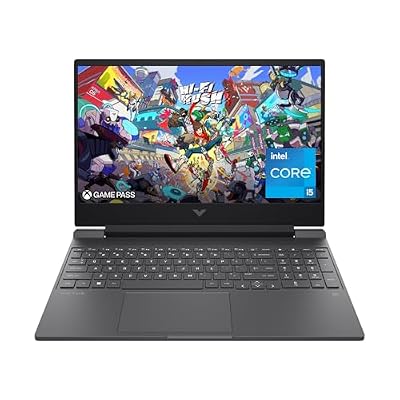
#1. HP Victus 15-fa1040nr: a clear Intel factory setup
The full 15-fa1040nr code identifies a useful setup to assess. HP's model sheet gives it a Core i5-12500H and an RTX 4050 Laptop GPU with 6GB GDDR6. It has 16GB DDR4-3200 RAM, fitted as two 8GB sticks. The SSD is listed at 512GB.
Those facts support a reason to check this model before the lower-memory options below. They do not prove that HP is the fastest gaming brand. The screen, power rules and measured game result still need their own evidence. A brand badge cannot settle those questions for every model it sells.
Read our Victus 15 review for the exact product number and panel limits. It also separates the port list from unconfirmed dock or USB-C charging assumptions. Those are concrete buying facts that a broad brand ranking would hide.
#2. Acer Nitro V ANV15-52-586Z: a separate screen choice
This Nitro V pairs a Core i5-13420H with an RTX 4050 Laptop GPU. It lists 8GB DDR5 RAM and a 512GB SSD. Its panel is specified at 165Hz Full HD IPS. Keep the complete ANV15-52-586Z code when you compare the selected store option.
That suffix separates it from the 144Hz Nitro V assessed elsewhere on this site. A shared family name does not make the two panels or service records identical. Nor does the shared GPU name make this Acer equal in game speed to the HP above.
The included RAM is the main trade-off to resolve. If your apps need more, confirm the exact upgrade route and full cost first. Do not treat a supported capacity as a free part of the base laptop. The whole laptop needs to fit your plan.
#3. HP Victus 15-fb1013dx: a different platform within one brand
The Ryzen Victus uses a Ryzen 5 7535HS with an RTX 2050 Laptop GPU. HP's exact sheet lists one 8GB DDR5-4800 module and a 512GB SSD. Its panel is specified at Full HD and 144Hz. These are separate parts from the Intel Victus above.
This is why a brand comparison needs models beneath each name. Two laptops can both say HP Victus 15 yet use different CPUs, GPUs and memory types. They may have different service and battery records as well. Do not expand one review's result across both.
We have no matched game test that makes this the best option for every buyer. Compare the GPU and its 4GB memory against the task. Keep the 8GB of system RAM separate from that graphics memory. The two amounts do not form one larger Windows-RAM total.
Best gaming laptop brands: compare models first
Start with the complete unit you can order. A familiar logo can help you find support, but it cannot identify every part inside a laptop. Retain the factory code and selected memory or storage option before reading a review or a specification table.
Brand
Identity to keep
Useful documentation check
Claim to avoid without evidence
HP
Full Victus code and product number
Exact model sheet, plus the correct service record
Every Victus has the same memory type or screen
Acer
Full ANV or AN code and part number
Exact configuration and service documents
Nitro V and Nitro 16 are one interchangeable family
ASUS
Full FA or FX sales code and region
US model record versus global options
Every family option is sold in every US configuration
Dell
Exact system model and order configuration
Matching owner's manual and configured parts
A family specification proves all installed options
Lenovo
Full machine type and model
Exact support/PSREF record, not only the family PDF
Every LOQ has the same CPU or graphics path
MSI
Full model suffix, including the US variant
Exact model specification sheet
A nearby Thin listing settles the RAM type
Scroll for more →
These are research checks, not scores for support quality or reliability. We have no comparable failure-rate or repair-time dataset for a brand ranking. Missing measurements stay missing rather than becoming a point advantage.
HP: keep fa and fb records separate
The two selected HP models make the distinction concrete. The 15-fa1040nr uses DDR4 with two supplied modules. The 15-fb1013dx uses DDR5 with one supplied module. Their named GPUs differ too. A Victus 15 title without its full suffix hides those changes.
HP's 15-fa1040nr sheet and 15-fb1013dx sheet are exact-model sources. Read those before using a family-level service guide to infer fitted parts. A manual may cover several options, while the model sheet describes the factory configuration.
The same care applies to RAM upgrades. A CPU limit, a parts list and the supplied module layout answer different questions. Our Victus RAM guide keeps those source types separate. Do not turn a possible maximum into memory already included with an offer.
Choose the actual model that meets your work. There is no need to declare every HP good or bad to make a narrow, useful decision about one Victus. Keep strengths and a real trade-off beside the exact setup.
Acer: the V and the full suffix matter
Nitro V 15, Nitro V 16 and Nitro 16 are separate names to retain. Removing the V can lead you to another chassis and service record. Screen size alone does not repair that mismatch. Start with the full ANV or AN identifier.
Our Nitro V assessment covers ANV15-51-51H9, a 144Hz configuration. The selected ANV15-52-586Z here lists 165Hz. Both name the same CPU and GPU models, but that does not establish the same panel, power behavior or upgrade limit.
The Nitro 16 guide and Nitro V 16 guide keep the larger families distinct. Their documented parts are research examples, not proof that a current qualifying offer exists for every configuration they discuss.
For Acer, judge the fitted RAM and the exact panel before a family reputation. A low-memory base unit may need a verified change to fit your workload. An upgrade that remains unclear should not be treated as a reason the brand is a better buy.
ASUS: a global family page is not a US sales option
ASUS family pages can describe several CPUs, GPUs and panels. The full sales suffix and region still matter. A global option list does not prove that the same combination is available in the US offer you selected.
Our TUF A15 guide separates its US and global records. The TUF F16 guide keeps the F16 configuration groups distinct. Use the complete FA or FX code rather than transfer a screen or battery statement between nearby family names.
A published maximum graphics power also needs its definition. It may include a boost allowance. It is not a game result or a promise of sustained operation at that figure. Keep the exact configuration and power conditions with any test you compare.
ASUS is not represented by a qualifying product card on this page. That describes this shortlist, not the whole market or the brand's quality. The configuration guides remain useful for reading exact records without inventing current stock or a budget-qualified winner.
Dell: use the matching system manual
Dell's G15 5530 manual index links the owner's manual for that system. Its scope includes specifications and hardware replacement instructions. A manual for another Dell with 5530 in the name is not automatically the same document.
The matching G15 owner's manual separates customer-replaceable parts from field-replaceable parts. Read the relevant record before assuming every part is a simple user upgrade. Accessible memory and an accessible SSD do not imply a removable CPU or GPU.
The configured order still needs to identify the parts supplied. A family specification may show several display or graphics options. It cannot establish that all are fitted together. Match the order configuration to the review and support document.
We include no Dell buying card in this shortlist. The documentation example helps you evaluate an exact system if one fits your budget. It is not a claim that every G15 is currently eligible or that a brand-level service outcome has been measured.
Lenovo: retain the machine type and model
Lenovo's support record for 83JC0001US identifies a LOQ 15ARP9. The full machine type and model is more precise than LOQ 15 alone. Keep that identity when comparing a seller option with Lenovo's records.
The 15ARP9 family specification includes more than one graphics option. An entry in that PDF does not put the same GPU into every model. Match the exact configuration before using a memory or power figure from the family table.
Processor details can also change the questions you need to ask. AMD's Ryzen 5 7235HS record says a discrete GPU is required. That fact must not become a claim that every LOQ lacks integrated graphics. Other CPUs need their own record.
Our LOQ battery guide explains why named tests and configurations must stay together. A family name does not establish an all-day result. We have no Lenovo buying card here and make no claim about every current US LOQ offer.
MSI: match the full Thin model suffix
MSI's exact Thin A15 B7UC-473US sheet names DDR4-3200 memory. That is a model-level fact, not a statement about every laptop sold as Thin A15. Keep the full B7UC-473US suffix when checking a listing or a memory claim.
A seller's changed RAM or SSD option needs its own description. If the listing changes the memory type as well as the amount, resolve that difference before relying on the record. Do not silently copy the more attractive field from either source.
Likewise, a Thin family name does not establish a particular GPU power limit or a measured quiet mode. Look for the exact model in a review. Retain the power setting and test conditions. A broad cooling label cannot supply those results.
MSI has no qualifying product card in this comparison. That is a limit of this shortlist, rather than a measured verdict on the maker. Use an exact specification and support record when evaluating another candidate. Do not infer that a similar suffix proves identical internals.
Support and warranty: compare the actual terms
Read the current US terms for the exact product and seller. A manufacturer warranty, store return policy and seller upgrade promise can cover different things. One does not automatically replace the others. Keep the source and date with any term that affects the purchase.
Check which region the product and warranty cover. A new laptop delivered to the US is not by itself proof of every US manufacturer service term. A store's broad brand name also does not establish who handles a modified unit. Resolve the actual support route before buying if it matters to your choice.
We have no matched dataset showing which of these brands repairs a problem fastest. A forum anecdote can describe one owner's experience, but it cannot establish a brand-wide failure rate or service average. We do not turn a handful of complaints into a reliability score.
For a useful comparison, note the stated coverage and who performs the work. Check how a claim starts and which records you need. Do not assume all sellers follow the same process. Read those terms again when you order, since policies can change.
Upgrade documentation and access
Memory amount and memory layout are separate facts. A total can be supplied as one module or several. That can change whether an upgrade fills an empty slot or replaces parts already installed. Keep the exact model's layout in your decision record.
Storage needs the same care. A family document's slot count may include occupied slots. The right drive size, mounting parts and service instructions can matter. Do not treat the word expandable as a complete plan for the laptop you will receive.
A maker's service document is useful evidence for that plan, but it is not a reason to ignore the terms of required work. Read the correct procedure and support rules before relying on a change. If you do not want to arrange the work, compare a suitable factory setup first.
One accessible part does not make every part upgradeable in the same way. A laptop with removable RAM may still need its CPU and GPU chosen at purchase. Do not import a desktop graphics-card upgrade path into a laptop decision without exact evidence.
Compare evidence quality across brands
Give more weight to a clear, exact record than to an attractive family slogan. A useful model sheet identifies the fitted CPU and GPU. It also makes the installed memory and screen option clear. Missing fields should remain unknown until a matching source resolves them.
Separate that hardware evidence from measured reviews. A specification can establish a refresh rate or memory amount. A suitable test can add game speed, panel response or runtime for the tested unit. Neither source should be made to answer a question it did not investigate.
The same rule applies to source errors. An official document can contain a wrong unit or a confusing option table. Flag the conflict and check another exact source. The maker's name does not turn an inconsistent field into a reliable fact.
For cross-brand tests, keep the setup conditions together. Resolution and visual settings matter. Fitted RAM and power mode matter too. A result measured on one configuration cannot be moved to another simply because both carry the same family name or GPU badge.
Choose a brand through a real task
Use a need you can check to narrow the choice. For Fortnite, Epic's PC requirements recommend at least 16GB of system RAM. The Intel HP supplies that amount. The two other selected models supply 8GB. That makes fitted memory a useful first filter, without declaring the whole HP brand better at the game.
League of Legends asks a different question. Riot's current Windows table recommends 4GB RAM. All three units supply more than that amount. It is then useful to weigh your other apps and daily carry needs. A lower game requirement does not prove the same laptop is best for every part of your day.
Recording can change the feature you need. NVIDIA's exact media matrix gives AV1 hardware encoding to the RTX 4050 Laptop, but not the RTX 2050. If your chosen workflow needs that feature, check the software and destination too. The useful distinction follows the exact GPU. It does not follow HP versus Acer, since these two HP picks have different GPUs.
For daily travel, a bare laptop weight leaves the adapter and cables out. Find a complete carry record or weigh the kit you need. A familiar thin-family name cannot fill a missing carry figure. Seek a matched battery test for the tasks away from power as well.
These examples show why the task comes first. A game-memory target can favor one supplied configuration. A media feature can favor another GPU class across more than one maker. A travel need can leave the evidence unresolved for all three. Each is a narrower and more useful conclusion than a claim that one logo wins every use.
A practical comparison before you choose
Build a short record for each candidate. Retain the complete model and selected option, then note the included parts. Add the exact source for any claim that changes the decision. That is easier to audit than a points table with unexplained scores.
Next, write one reason the model fits your task. Keep it concrete, such as reaching an app's stated memory amount with the parts supplied. Then write one real trade-off. A missing measurement should not be recast as proof of a benefit.
Compare the complete purchase, including any required change. A base configuration that needs uncertain work is a different plan from a suitable factory unit. A qualifying offer also needs a current check; a past budget result should not outlive its evidence.
Finally, read the selected option in the cart again. A memory bundle or panel choice can change while the picture remains the same. If the title and fitted-parts table disagree, ask which will arrive. Do not assume the better description wins.
Factors to consider when comparing brands
Start with games and work apps, not a brand score.
Retain the complete factory code and selected option.
Match the CPU and laptop GPU to their exact records.
Record supplied RAM, layout and storage separately from possible upgrades.
Check the actual panel and port implementation.
Seek matched tests for game speed, noise and unplugged use where those matter.
Read the current seller and manufacturer support terms.
Keep the complete new purchase inside your budget.
More in this guide
HP Victus 15: the exact Intel configuration
Acer Nitro V: why full model codes matter
ASUS TUF Gaming F16 configuration guide
ASUS TUF Gaming A15 US and global records
FAQ
What is the No. 1 gaming laptop?
We have no evidence for one universal winner. Each maker can offer different parts and limits across its range. Choose an exact configuration that meets the task, then compare its sources and terms. A familiar logo does not establish the result of every laptop behind it. Our first pick reflects supplied memory, without a measured game-speed win.
Are two laptops in the same family interchangeable?
No. The two Victus models here use different CPUs, GPUs and memory types. Nitro V variants also need their full suffix. Keep each model's screen and service record separate before transferring a review result.
What is the best budget laptop?
Start with the games and apps it must run. The Intel HP here supplies 16GB RAM, while the Acer and Ryzen HP supply 8GB. Those facts help narrow a choice when fitted memory matters. They do not establish a winner for every buyer. Check the full configuration, its limits and the complete purchase before choosing.
How much RAM does a gaming laptop need?
Use each game's current requirements, then account for your other apps. Epic recommends 16GB for Fortnite; Riot recommends 4GB for League. Both sources are linked above. These different targets show why one amount cannot answer every use. The supplied amount is what arrives. A higher supported maximum does not mean an upgrade is included.
Best gaming laptop brands: how we picked and verdict
We checked exact catalog identities and new US offers below this site's ceiling. Manufacturer records support the model distinctions. The three selected laptops represent HP and Acer; the other maker sections explain documentation checks rather than add unverified buying cards. We have no hands-on test or brand-wide reliability study.
For the best gaming laptop brands at this ceiling, start with the configuration that fits. Check the Intel HP first when 16GB of supplied RAM is a firm need. Weigh the Acer's panel and RAM trade-off, and assess the Ryzen HP with its different GPU. Return to the main buying guide for the complete choice. Report a model or source mismatch through contact and corrections.