As an Amazon Associate, this website earns from qualifying purchases.
The short answer
Consider the ANV15-51-51H9 for a desk setup with RTX 4050 graphics. Its 8GB of installed RAM is the main compromise. We assess documented parts, with no hands-on frame-rate or battery test.
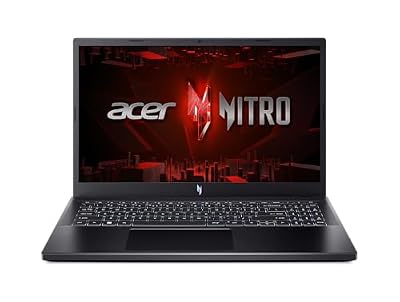
An Acer Nitro V can make sense when you want a dedicated graphics chip and can plan around modest installed memory. The configuration assessed here is ANV15-51-51H9. It pairs an Intel Core i5-13420H with an RTX 4050 Laptop GPU, a 144Hz Full HD screen, 8GB of DDR5 memory and a 512GB SSD. Those parts define this review. They do not describe every Nitro V.
We have not tested this laptop. Our verdict comes from its documented configuration and the buying trade-offs below. We do not turn a graphics badge into a measured frame rate, or repeat a seller's battery claim as a result. If you want a laptop that needs no memory planning, compare the installed RAM before choosing this one.
The Acer Nitro V's clear parts list is a useful starting point. You can match a named CPU, laptop GPU and screen to your needs. The main drawback is the memory supplied. Treat any upgrade as part of the decision, rather than a free fix that makes the base laptop better on paper.
Choose it only after checking the games and apps you will use. Skip it if your work calls for more installed memory and you do not want to arrange an upgrade. Also look elsewhere if your main requirement is a proven day away from a socket. We do not have a matched runtime test to support that promise.
Strengths and limits
Useful feature
What to weigh against it
Named RTX 4050 Laptop GPU
No matched game-speed test or confirmed exact-unit GPU power limit in this assessment
144Hz Full HD screen
Refresh rate does not prove brightness, color coverage or pixel response
DDR5 memory and a 512GB SSD
Only 8GB of RAM is supplied; plan storage around your actual installed games
Wi-Fi 6, Ethernet and Thunderbolt 4 listed
Check each device's full data and power route
Scroll for more →
Match the Acer Nitro V model code first
The short name on a shopping page is not enough. ANV15 identifies a different branch from ANV16, and the complete suffix matters. A newer Nitro V 15 may use another panel or CPU. Its memory layout can change too. Keep ANV15-51-51H9 beside you as you read a listing and check the selected option.
Start with three places: the product title, the selected memory and storage option, and the model field. All three should describe the same configuration. If one says 8GB and another says 16GB, do not combine them into a better laptop. The seller may have a modified option, or the page may mix details from several versions.
Ask which full configuration will arrive if the fields disagree. Keep the answer with the order record. A photo of a laptop with the same chassis does not prove its internals. Nor does a review of another Nitro V settle what this seller supplies.
The same caution applies to the generation. The number in the processor name helps identify that processor, but it is not a full laptop release date. A seller can continue offering an older configuration. A recent listing date does not turn its parts into a newer model.
Our Nitro V 16 configuration guide explains why the 16-inch branch needs separate records. Use it when comparing a larger Nitro V. Do not carry its battery or port facts back into this 15.6-inch setup. Check the memory record separately too.
What the graphics specification tells you
This configuration lists an RTX 4050 Laptop GPU. The word Laptop matters. A desktop graphics card with a similar number is not a valid performance substitute. NVIDIA's laptop comparison is the right starting point for mobile GPU features and memory specifications.
A GPU name is still only one part of the system. Power settings, cooling, game version and the CPU can affect a result. We have not confirmed the GPU power limit for this exact laptop. We leave it unknown. A figure from a different Nitro V or another brand cannot fill that gap.
Compare any published game test by its full setup. Check the screen resolution and graphics preset. Was ray tracing on? Read whether the test used upscaling or frame generation too.
A single headline number can hide those choices. It can also hide a memory upgrade that the laptop in your basket does not include.
Frame generation adds frames. Upscaling builds a larger image from a lower-resolution one. A game's native rendering result measures a different task.
Support depends on the game and software. Do not assume a listed feature works in every title. If a test uses it, keep that setting with the quoted result.
This review gives no FPS estimate. We have not run the test needed to give one. The parts list tells you what to check next. It cannot prove that your game will meet a chosen speed target at a chosen preset.
The 144Hz screen is a specification, not a game result
The listed screen is a 15.6-inch Full HD IPS display with a 144Hz refresh rate. Its resolution and refresh rate are clear buying facts. They do not prove brightness, color coverage, response time or viewing quality on the exact unit.
Refresh rate tells you how often the panel can refresh. It does not promise that the GPU will supply that many new game frames each second. A demanding game may run below that rate. A less demanding game may behave differently. Both need their own test conditions.
If you edit images or video, look beyond the IPS label. Ask for the exact panel's color specs or a measured review. A screen can suit general use yet lack the color range your work needs. We have no panel test here to make that stronger claim.
An external screen brings another set of checks. Confirm the laptop's output, the monitor's input, the cable and the resolution and refresh rate you want. A connector shape alone does not settle the complete route. Dock support may add further limits.
Before ordering, decide whether the built-in screen will be your main display. If it will, panel evidence deserves more weight than it would in a fixed desk setup with a suitable external monitor. That choice can change which compromise matters most.
Memory is the main buying trade-off
The configuration assessed here includes 8GB of DDR5 RAM. Installed RAM and graphics memory are separate. A product page that lists dedicated GPU memory has not added that amount to the memory Windows and your open apps can use.
Check your actual workload before deciding that the installed amount is enough. A game, browser, voice chat and school app all need working memory. The demands depend on those programs and what they are doing. We do not assign a universal performance gain to a memory upgrade.
If you plan to add RAM, first confirm the service instructions for the exact model. Find out which slots are occupied, which module type is required and what capacity Acer documents. The CPU's theoretical memory limit is not proof that the laptop supports that amount.
Do not infer the slot layout from the total alone. The same total can be fitted in more than one way. Replacing an old module is a different purchase from filling an empty slot. A seller may have changed the factory setup too.
Compare the full cost with a laptop that includes the RAM you need. Add parts and any fitting work. Read the warranty terms for that work too. You may prefer a sealed factory setup with no parts to fit. That can matter more than the GPU badge.
Avoid choosing a machine that only fits your plan after several unconfirmed upgrades. Resolve the first required change before paying. Our HP Victus RAM guide shows how to separate a maker limit from other kinds of memory evidence. Its HP-specific limits do not apply to this Acer.
Plan around the installed SSD
The listed storage is a 512GB Gen 4 SSD. The advertised capacity is not the free space you will see after setup. Windows, recovery files, bundled apps and later updates all use space. Leave room for the games you actually install and the files you keep.
Make a short list of your regular games. Check their current storage requirements with their publishers, then add your own work files and update headroom. A large game library in an online account is different from keeping every game installed at once.
If you intend to add storage, confirm the exact model's supported drive format and the state of its slots. A family specification that mentions two slots does not necessarily mean two are free. Check whether you need mounting parts, such as a screw or shield.
An external drive can help with files, but it is not automatically the same solution as an internal game drive. The app's rules and connection matter. Consider how you will carry and use the drive too. Decide where the files need to be used before treating removable storage as the answer.
Back up your work before changing storage. A second drive is not a backup when both copies face the same loss or damage. Focus on the space you can use and where your files will live. The SSD's generation alone does not decide game speed.
Ports, networking and a desk setup
The catalog lists Wi-Fi 6, Gigabit Ethernet and Thunderbolt 4. Check those options against your desk. A badge does not prove your home signal is good. It does not prove a dock will work, or tell you the delay in an online game.
Start by listing the things you connect at the same time. A mouse, headset, external screen and storage drive may use several ports. Note which devices need data or video. Check the audio and charging routes too. Then read the exact laptop's port layout rather than relying on a generic photo.
USB-C devices do not all do the same job. Read the device's needs and the laptop manual. A small charger may not replace the supplied gaming adapter under load. Check both the supported input and the power the task needs.
Accessory tips
We have not confirmed a specific dock, charger or RAM kit for this exact model. Match those items to the correct port and service record before buying them. A familiar connector or memory label is not enough to settle fit.
Ethernet gives you a wired option where the network supports it. The cable and router still affect the complete path. Your internet connection matters too. We do not describe a networking badge as proof of stable play or fewer disconnections.
For a desk, think about cable reach and vent clearance as well as port count. Put the laptop on a suitable firm surface and follow Acer's handling guidance. A tidy connection plan is useful; covering a vent to make the desk look cleaner is not.
Cooling, noise and NitroSense
The catalog describes dual fans and NitroSense controls. That establishes the presence of the cooling design and software tools. It does not establish a measured surface temperature, fan-noise level or sustained speed in your room.
If noise matters, look for an exact-configuration review that names the operating mode and test. A maximum fan setting and a quiet profile solve different problems. Comparing results without their modes can make unlike tests look equal.
The same applies to temperature. A test needs its workload, room conditions and measurement point. A warm area on the chassis is not the same figure as a CPU sensor reading. We do not merge those numbers into one claim about comfort or reliability.
Use the maker's software and service guidance when checking settings. Keep the laptop's vents clear and avoid unsupported adjustments just to match a result seen online. A review can help you choose a product without becoming a guide to unverified tuning.
Portability and battery: keep the evidence separate
A 15.6-inch screen tells you the display's diagonal. It does not tell you the full carry load. Include the laptop, its adapter, cables and anything else you need each day. Check the bag dimensions against the chassis rather than screen size alone.
We have no matched battery test for this setup. That leaves unplugged work time unknown. A seller's estimate cannot fill the gap. Nor can another Nitro V's result or the battery's stored energy.
For school or work, define the unplugged task. Reading documents, joining a video call and playing a game place different demands on a laptop. A video-playback test cannot promise the same hours in a class that uses several apps.
If you need a full day away from power, make that requirement a buying gate. Find a suitable exact-model test, or choose a configuration with stronger evidence for that task. Do not buy on the assumption that a gaming machine's software modes will solve an unknown runtime limit.
Nitro V versus Nitro 16
Nitro V and Nitro 16 are separate model lines. The names can sit close together in search results, but the chassis, panel options and component records need their own checks. Our Nitro 16 configuration guide keeps exact Acer records separate.
Compare complete laptops you can order. A rival's better parts do not help if that setup exceeds your budget. They do not help if it cannot be supplied either. A low starting-price headline also tells you little about the parts in that option.
Choose the comparison fields before choosing the winner. For a fixed desk, those may be GPU, installed RAM and outputs. For travel, add carry load and a suitable battery test. For creative work, check the apps and panel evidence. There is no single family winner for all three jobs.
This Nitro V gives you a named laptop GPU and a clear parts list. It also has a clear memory drawback. Assess a rival in the same way. Find a reason to choose it and a real limit. Keep each test result tied to the laptop that was tested.
Factors to consider before choosing this Acer Nitro V
Use these checks in order. They help you decide whether this exact laptop fits your plan before you follow a purchase link.
Match ANV15-51-51H9 to the selected option. Resolve any mismatch in its model code or fitted parts.
Check your games and required apps. Keep minimum requirements separate from the quality and speed you want.
Decide whether 8GB of installed RAM meets that workload. If an upgrade is required, confirm the exact route first.
Plan the SSD space you will use. Do not count all advertised capacity as free space after setup.
Check the screen evidence that matters to you. Refresh rate alone does not prove motion clarity or color quality.
Check the ports and adapter against your desk or travel setup. Keep charging and gaming-power needs separate.
Read the seller, return and warranty terms for the actual configuration. A brand name is not proof of every seller's service terms.
If a key field remains unclear, pause the purchase and ask for that fact. This is more useful than giving the laptop an invented score. A missing fact can change the choice even when the published parts list looks appealing.
We checked this product's Creators catalog record on October 17, 2026. For GPU context, see NVIDIA's laptop specs. Intel's buying guide explains how to compare the whole system. We have no hands-on test results for this unit.
We chose this exact setup for its named laptop GPU and clear base memory. We then checked what those parts can prove about fit. The installed RAM is a buying limit, rather than a reason to invent a test result. Other Nitro V versions need their own records.
For a model mismatch or a factual correction, use contact and corrections with the page URL and the relevant source. Include the full model code, but keep private serial numbers out of your message.
Final verdict: who should choose the Acer Nitro V
Consider this Acer Nitro V if you want its listed GPU and Full HD high-refresh screen. Plan around the RAM supplied. The named setup is a clear starting point for a comparison. You still need evidence for the games you play.
Skip it if you need more RAM fitted at the factory or a proven workday away from power. Seek a tested panel if color is key to your work. Resolve those needs before you order. For a broader view, return to our gaming laptop buying guide and compare the full setup against your task.
Judge the full model code. This ANV15-51-51H9 has an RTX 4050 Laptop GPU and a 144Hz Full HD screen, but only 8GB of installed memory. Those facts support a conditional choice, not a verdict on every Nitro V.
What year is the Acer Nitro V-15?
The name spans configurations. Match ANV15-51-51H9 and its Core i5-13420H rather than treating the page date as the laptop's release year.
What is the weakness of an Acer laptop?
For the configuration assessed here, 8GB of supplied RAM is the clear limit to weigh. We have no matched gaming, noise or unplugged-runtime test that would justify a wider brand claim.