As an Amazon Associate, this website earns from qualifying purchases.
The short answer
Assess the 15-fa1040nr first when 16GB fitted RAM suits your work. The Ryzen and older Intel units supply 8GB. Keep each exact model and panel record separate; no matching game or runtime test establishes a winner.
Compare this setup when the Ryzen 5 7535HS fits your apps and you accept its supplied 8GB RAM and RTX 2050 graphics.
Ryzen 5 7535HS; RTX 2050 Laptop GPU, 4GB
8GB DDR5-4800 fitted as one module
512GB SSD; 15.6-inch Full HD 144Hz IPS panel
Keep in mind:It has 4GB graphics memory and 8GB system RAM. The parts do not establish a game-speed or battery result, and the stated panel color range is modest.
Assess this full model if the Core i5-12500H and RTX 3050 Laptop graphics fit your actual software and you can accept 8GB RAM as supplied.
Core i5-12500H; RTX 3050 Laptop GPU, 4GB
8GB DDR4-3200 as two 4GB modules
512GB SSD; 15.6-inch Full HD panel
Keep in mind:The RAM is fitted as two 4GB modules, occupying both slots. Its screen refresh rate is not established in the retained model sheet; do not borrow another Victus's 144Hz figure.
The best HP gaming laptop at this ceiling needs a full model check. This shortlist compares three exact Victus configurations. They have different fitted memory and graphics. None is presented as a measured winner across every game, or as proof that all HP laptops share the same parts.
We would check the 15-fa1040nr first when its 16GB supplied RAM fits your task. The Ryzen model offers a different platform with 8GB. The older Intel model also supplies 8GB and has its own screen record. This is a sourced parts comparison, with no hands-on performance or battery test.
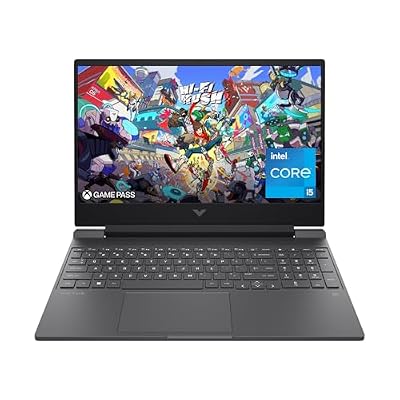
#1. HP Victus 15-fa1040nr: more RAM already fitted
HP's 15-fa1040nr sheet identifies a Core i5-12500H and RTX 4050 Laptop GPU with 6GB GDDR6. It supplies 16GB DDR4-3200 as two 8GB modules, plus a 512GB SSD. Its Full HD IPS panel is specified at 144Hz.
Those fitted parts make it worth assessing first for a workload that calls for 16GB. The extra memory is not a fixed speed score. Read the exact Victus review for the product number and panel limits before choosing from the family name alone.
#2. HP Victus 15-fb1013dx: a six-core Ryzen option
Compare this setup when the Ryzen 5 7535HS fits your apps and you accept its supplied 8GB RAM and RTX 2050 graphics.
Keep in mind: It has 4GB graphics memory and 8GB system RAM. The parts do not establish a game-speed or battery result, and the stated panel color range is modest.
HP's 15-fb1013dx model sheet names the Ryzen 5 7535HS and RTX 2050 Laptop GPU with 4GB GDDR6. It lists 8GB DDR5-4800 as one module, with a 512GB SSD. The screen is Full HD IPS at 144Hz.
The sheet states 250 nits and 45% NTSC for the panel. AMD identifies the 7535HS as a six-core, 12-thread Zen 3+ processor. That layout is a platform difference to assess, rather than a measured win over either Intel laptop.
#3. HP Victus 15-fa0025nr: a separate Intel and RTX 3050 setup
Assess this full model if the Core i5-12500H and RTX 3050 Laptop graphics fit your actual software and you can accept 8GB RAM as supplied.
Keep in mind: The RAM is fitted as two 4GB modules, occupying both slots. Its screen refresh rate is not established in the retained model sheet; do not borrow another Victus's 144Hz figure.
HP's exact 15-fa0025nr sheet, mirrored here, identifies a Core i5-12500H and RTX 3050 Laptop GPU with 4GB GDDR6. It lists 8GB DDR4-3200 as two 4GB modules and a 512GB SSD. The screen row gives Full HD, 250 nits and 45% NTSC.
The retained sheet does not establish a refresh rate. Keep that field unknown rather than give it the other two models' screen figure. This unit shares a CPU name with the first pick, but its fitted RAM and GPU differ. Their complete-system results cannot be assumed equal.
Best HP gaming laptop: compare full model codes
The Victus name does not identify a fixed configuration. Keep the full 15-fa or 15-fb code with each parts record. Add the product number when it is available. A family-level support page may describe options that are not fitted in the selected unit.
Read the store's selected variant before ordering. A title or photo can look familiar while the memory bundle changes. If its fields contradict each other, resolve the conflict rather than choose the more attractive description. A new-stock offer alone does not settle the exact hardware identity.
Exact model
CPU and graphics
Fitted RAM
Main limit to retain
15-fa1040nr
Core i5-12500H; RTX 4050 Laptop, 6GB
16GB DDR4-3200, two 8GB modules
Both slots occupied; stated panel color limits
15-fb1013dx
Ryzen 5 7535HS; RTX 2050 Laptop, 4GB
8GB DDR5-4800, one module listed
Base RAM and graphics-memory limits
15-fa0025nr
Core i5-12500H; RTX 3050 Laptop, 4GB
8GB DDR4-3200, two 4GB modules
Both slots occupied; screen refresh not established
Scroll for more →
The order is based on supplied-memory fit and a separate Ryzen option. It is not a benchmark ranking of the three GPUs. We also have no valid failure-rate or service-quality comparison that would turn these units into a brand-wide reliability score.
CPU and GPU names do not establish game speed
Match the exact games and settings you expect to use. Read current publisher requirements to identify gaps. Then seek a complete-laptop test for a firm frame-rate need. A chip name or memory amount alone does not supply that result.
Keep laptop and desktop GPU evidence separate. The same family number is not proof of equal hardware or operating conditions. A test also needs to state the power mode and whether the adapter was connected. Those details limit what can be transferred to your task.
The RTX 4050 unit has a different graphics-memory capacity from the two 4GB options. That is a useful fact to compare with your games. It does not establish a fixed quality preset or make every demanding title suitable without the rest of the evidence.
RAM and a verified upgrade route
The first pick supplies 16GB, while the other two supply 8GB. Start with the amount included at sale. A maximum supported total is not the fitted amount, and a slot count does not prove that a slot is empty.
HP identifies two occupied slots on the 15-fa1040nr through its two supplied modules. The 15-fa0025nr also lists two modules across two accessible slots. Do not assume either is a simple empty-slot addition. The Ryzen sheet lists one supplied module, but a supported parts and fitting check still comes first.
Our Victus RAM guide explains how to match the product number and service record. We have not verified a named RAM kit for these units. Include any required parts and fitting work in the complete decision before relying on an upgrade.
Screen evidence needs the same precision
The two newer records state 144Hz panels. The retained 15-fa0025nr sheet does not give a refresh figure. This is an example of why a common family name cannot fill a missing field.
All three exact sheets state a modest 45% NTSC gamut and 250-nit brightness. These are maker figures, not our measured results. No built-in panel here is presented as a verified choice for critical color work. Refresh rate cannot cancel that separate need.
If you use an external monitor, check the complete connection. The exact laptop output and the monitor input must fit the intended mode, with the cable included. A USB-C connector alone does not prove every display feature or laptop input-charging path.
Carry weight and runtime remain separate questions
A laptop-only weight leaves the adapter and cables out of the bag. Use comparable full-kit evidence if daily carry is firm. We do not infer a comfortable travel setup from the Victus name or screen size alone.
For battery life, require an exact configuration and a test that resembles your task. A maker's maximum for light work cannot establish game runtime. Battery capacity is not hours of use. No matching unplugged result is used to rank these three units.
Read the Victus 15 battery guide before treating a family-level claim as a result for the selected laptop. If time away from power is essential and still unverified, keep that need open rather than invent an all-day promise.
Factors to consider
Match the full Victus model and selected merchant configuration.
Name the games and apps you must run.
Check supplied RAM before planning an upgrade.
Keep graphics memory separate from system RAM.
Retain the exact panel record, with unknown fields visible.
Resolve required ports and accessories before relying on them.
Seek matching game and battery tests for firm performance needs.
FAQ
Which HP gaming laptop is the best?
Assess the exact 15-fa1040nr first when its fitted 16GB RAM suits your apps and games. Compare the Ryzen and older Intel units as separate models with 8GB starting points. No matching game or battery test establishes a winner for every use.
What are the cons of HP laptops?
For these exact models, weigh the stated panel limits and fitted memory. The 15-fa1040nr and 15-fa0025nr have both RAM slots occupied. The older Intel unit's screen refresh rate remains unverified. Those are model-specific limits, not a brand-wide reliability score.
Is 32GB RAM overkill for a gaming laptop?
Choose capacity from your actual apps and games. These picks supply 16GB or 8GB; no matching workload test here establishes a benefit from a larger kit. Extra capacity is not a fixed speed score, and an upgrade still needs a parts check.
Best HP gaming laptop: how we picked and verdict
We checked exact catalog identities and new US offers below this site's ceiling. The three linked HP model sheets supply fitted parts and stated screen limits. AMD supplies the Ryzen layout. We use those facts without claiming hands-on tests or assigning a result from another variant.
For the best HP gaming laptop, assess the 15-fa1040nr first when 16GB fitted RAM suits your task. Compare the Ryzen and older Intel units as separate configurations, with their 8GB starting points visible. The main buying guide keeps the whole purchase in view. Use contact and corrections for a factual mismatch.