3 Best Laptops for Programming and Gaming Under 1000 in 2026
As an Amazon Associate, this website earns from qualifying purchases.
The short answer
Check the full toolchain before the games. The HP supplies 16GB RAM; both Acer units supply 8GB. An editor minimum does not qualify an emulator or local service stack, and no matching compile test establishes a winner.
Assess this exact unit if its named CPU and GPU fit your tools and games, with the supplied 8GB RAM kept in view.
Core i5-13420H and RTX 4050 Laptop GPU
15.6-inch Full HD IPS screen, 144Hz
8GB DDR5 RAM; 512GB SSD
Keep in mind:It also falls below the current Studio-plus-Emulator RAM minimum as supplied. The other Nitro V's service facts cannot establish this unit's upgrade route.
The best laptop for programming and gaming has to fit the whole toolchain. A code editor's small minimum does not cover an emulator or a local container stack. Start with the tools you must run together, then assess the games. The two tasks do not share one simple hardware score.
We would check the HP first if your work needs 16GB of RAM as supplied. Both Acer units start at 8GB. All three list RTX 4050 Laptop graphics. This is a source-based comparison, with no hands-on compile, emulator or game-speed result.
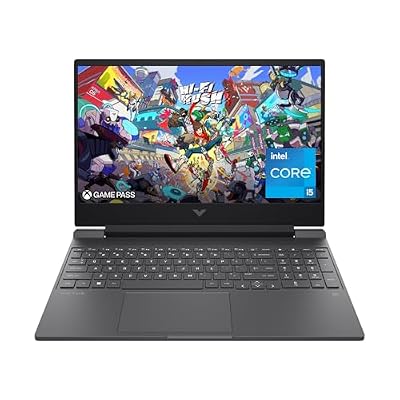
#1. HP Victus 15-fa1040nr: more development memory supplied
Start here if your toolchain needs 16GB system RAM and you want that amount fitted before any upgrade.
Keep in mind: Both RAM slots are occupied. The built-in panel has a stated 45% NTSC gamut, and no matching compile or battery test is established here.
HP lists a Core i5-12500H, RTX 4050 Laptop GPU and 16GB DDR4-3200. The memory uses two 8GB sticks. Its SSD is listed at 512GB. Those are parts you can compare with the current requirements of your tools.
Intel lists the i5-12500H with four performance cores and eight efficient cores, for 12 cores and 16 threads. That layout does not prove a compile-time lead in your project. The Victus review keeps the full laptop's screen and service limits visible.
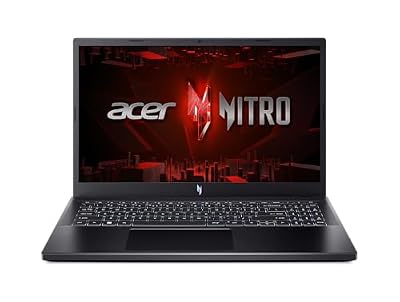
#2. Acer Nitro V ANV15-52-586Z: assess its 8GB starting point
The ANV15-52-586Z lists a Core i5-13420H and RTX 4050 Laptop graphics, with 8GB DDR5 and a 512GB SSD. Its Full HD IPS panel is specified at 165Hz. The refresh figure is a screen fact, rather than an IDE or game benchmark.
Intel lists the i5-13420H with four performance cores and four efficient cores, for eight cores and 12 threads. Check the complete laptop and your task rather than choose by a generation number alone. Memory and the exact workload remain part of that choice.
#3. Acer Nitro V ANV15-51-51H9: a separate 144Hz option
Assess this exact unit if its named CPU and GPU fit your tools and games, with the supplied 8GB RAM kept in view.
Keep in mind: It also falls below the current Studio-plus-Emulator RAM minimum as supplied. The other Nitro V's service facts cannot establish this unit's upgrade route.
This model lists the same CPU and GPU names as the other Acer. It has 8GB DDR5 and a 512GB SSD, with a Full HD IPS panel at 144Hz. Keep the whole ANV15-51-51H9 code instead of treating the two Nitro V records as one unit.
Our exact Nitro V review explains its limits. A shared chip name does not prove equal sustained build speed or fan noise. Neither laptop has a matching project test retained here, so we do not award one a development-speed win.
Best laptop for programming and gaming: start with the tools
Write down the editor and the language runtimes you use. Include the services that must run locally. Then note which tools stay open at the same time. This is a better starting point than a broad label such as coding laptop.
Use the current requirements for each required tool. A class or employer may specify a particular version, which can differ from the latest public release. If so, check the version you must use and confirm that it remains supported for your work.
Keep permission separate from hardware support. A managed work laptop may block a feature even when the CPU supports it. A personal laptop may also be barred from an employer's systems. Resolve those rules before using a strong parts list to justify a purchase.
Development task
Evidence to check
Shortlist implication
Code editor alone
The editor's current supported OS and hardware
A small editor minimum does not cover the full project
Android Studio plus Emulator
Current RAM and virtualization rules
HP supplies 16GB; both Acer units supply 8GB
Local containers
Backend, OS edition and virtualization requirements
A GPU name does not establish the complete setup
Large local builds
Matching project and compiler test
Core count alone is not a measured build time
Remote development
Local client plus service access and policy
A remote host's power is not local laptop performance
Games after work
Current game requirements and exact-laptop tests
Development suitability cannot supply a game frame rate
Scroll for more →
If one tool sets a firm higher requirement, let that tool lead. Do not qualify the whole setup from the lightest app in it. A laptop that suits a simple editor can still miss the needs of an emulator or a large local service.
An editor minimum is a narrow fact
Visual Studio Code's hardware guidance recommends a 1.6GHz or faster processor and 1GB RAM. That is guidance for the editor. It is not a promise that every extension and language tool works well within that amount.
An editor can launch other tools as part of your project. Those tools have their own requirements. Read them too, and include the browser or local server used to check your work. Keep the editor's base needs separate from the task you build around it.
Do not treat the low published number as a target for a whole new laptop. It establishes only one part of the decision. Compare actual fitted RAM with the complete workflow you expect to use, then seek a relevant test if performance will decide the purchase.
The HP's extra supplied memory makes it worth checking first for a workflow that needs it. That does not prove every small project feels faster. If your work fits comfortably within another exact setup, a memory amount alone cannot tell you which keyboard or screen you will prefer.
Android Studio and an emulator raise the memory check
Google's current Windows requirements separate Studio alone from Studio plus Emulator. The former has an 8GB RAM minimum; the latter has a 16GB minimum. The recommended amount is 32GB. Those are different levels of use.
The HP reaches the listed Studio-plus-Emulator minimum RAM amount as supplied. Both Acer units reach the Studio-alone minimum but supply less than the combined minimum. None of the three comes with the recommended 32GB system RAM in the selected record.
That comparison does not establish a complete emulator pass. Google also requires suitable virtualization support enabled in BIOS. A CPU's listed support does not prove the shipped firmware state or your right to change it. Check those conditions for the device you will use.
The current emulator graphics guidance asks for 4GB of graphics memory at minimum and recommends 8GB. The selected RTX 4050 Laptop GPU has 6GB. It sits between those amounts. No smoothness result for your virtual device follows from that capacity comparison.
If a course expects multiple virtual devices at once, ask for the actual teaching setup. Do not use a one-emulator minimum to describe a larger exercise. The number and type of devices form part of the workload, as do the apps running beside them.
Containers need the right backend and OS
Docker's current Windows install guide has separate rules for its backends. The x86 WSL 2 path includes an 8GB system-RAM requirement and enabled hardware virtualization. The Windows and WSL versions must fit that path too.
Windows containers need the supported Pro or Enterprise route. Windows Home supports Linux containers rather than Windows containers. Do not assume every Windows edition supplies the same container workflow. Check the exact task and current installation mode with the guide.
A compatible base setup is not a benchmark of your container stack. The services you run inside it need resources too. List what you intend to start locally, including any database. Then check the application's own needs rather than stop at the desktop tool's minimum.
If your project has a documented development setup, use that record. A team can often tell you the expected services and versions. That is more useful than a generic claim that a gaming laptop can run containers. It also exposes a requirement before the purchase becomes hard to change.
We do not claim that the selected laptops arrive with the needed firmware options already enabled. Nor do we claim that every managed device permits the change. Treat a blocked or unknown setup step as something to resolve, not a reason to infer success from the processor name.
WSL is not the same as a native Linux test
Microsoft's WSL guide describes running Linux distributions on Windows. Follow its current setup requirements for a compatible Windows version. The install path can require admin access and a restart. That is a separate software setup from buying the hardware.
WSL support does not prove that every laptop component works under a native Linux installation. Wireless and graphics behavior need their own exact-model evidence if you plan to replace Windows. We have not performed such a hardware compatibility test on these units.
If native Linux is essential, choose a distribution and version first. Seek a reliable record for that exact laptop and its parts. A report for a related family model may involve another wireless card or GPU mode. Do not treat a shared case design as a full compatibility match.
Also check the games you require under the intended software setup. Their current supported platforms and any service rules still apply. Development support for Linux cannot stand in for a game's own compatibility statement. Keep those two checks separate.
CPU layout and build speed
The HP's i5-12500H has more listed cores and threads than the i5-13420H in either Acer. That is a documented difference. It does not establish a fixed advantage in every compiler or project. A full-system test is needed for a build-time claim.
Check what a benchmark actually builds. The source version and compiler flags matter to the comparison. A small clean build and a large incremental build answer different questions. If the result gives no method, it cannot reliably settle your own workload.
Memory capacity is part of the same complete-laptop check. A CPU result from a unit with a different RAM amount may not describe the configuration you will buy. Power mode and the adapter state need to be clear too. Keep a measurement attached to its tested setup.
We have no matching build-time results for the three selected units. The ranking therefore starts with the practical supplied-memory difference. It does not label a compile-speed winner. See the CPU comparison for the wider parts-based decision.
Dedicated graphics and development needs
A dedicated GPU is not a universal requirement for writing code. Start with the tools that must use it. If your work has no such need, its main role in this purchase may be the games. Do not let an unused feature displace the memory or screen your work does need.
For a graphics or machine-learning tool, read its exact supported GPU and driver requirements. A broad RTX label is not enough to prove support for every software version. Memory on the GPU is also separate from system RAM. A larger amount of one does not replace the other.
NVIDIA lists RTX 4050 Laptop graphics with 6GB GDDR6. That capacity is a fact to compare with your tool's guidance, not a promise that every local model or scene will fit. We have not measured any of those workloads on these laptops.
If your work depends on a particular GPU feature, check the whole software path before buying. Keep the exact tool and version with the requirement. A feature that exists in the hardware still needs support from the app you use.
Storage for projects and games
Each selected unit lists a 512GB SSD. That is drive capacity, rather than the free space left after setup. Windows and installed tools use part of it. Your local project data and game library need their own room too.
Make a list of the large things you expect to keep locally. Include the development environments you actually need, rather than every tool you might try. Then consider the games that must stay installed. This gives you a clearer storage plan than counting only source files.
If an extra drive is essential, verify the exact laptop's storage route. Check the supported drive type and any occupied slot. A family guide can describe options without proving the shipped layout of your selected unit. Do not count an unknown slot as available capacity.
An external drive needs a suitable connection for the task you plan to put on it. Check the exact port and cable. We do not establish a transfer-rate result for any chosen drive or adapter here. A USB-C shape alone is not that evidence.
Keep a separate copy of important work
A larger SSD does not replace a backup. Decide how you will recover work if the laptop is lost or the drive fails. Test that you can restore a useful file through your chosen process. A copy that has never been checked is a weak recovery plan.
Version control can be part of your workflow, but do not assume every important file is tracked. Check local data and any uncommitted work. Follow your project's rules for credentials and private files rather than placing them in an unsuitable shared location.
If the laptop will serve a job or course, use its approved storage and recovery route. A personal sync account may not be allowed for that work. Keep the policy check separate from whether the laptop has enough space.
This is a practical buying issue because the machine may be your only local work device. Include any needed storage and recovery tools in the complete decision. Do not spend the whole purchase plan on a GPU while leaving a firm work requirement unresolved.
Screen and keyboard for long coding sessions
All three built-in displays are listed at Full HD. The Acer refresh options differ, but refresh alone does not tell you whether the working area suits your code layout. Decide how you will arrange the editor and reference material at the desk.
The HP's stated 250-nit brightness and 45% NTSC gamut are known limits. We have no matching brightness or color test for either Acer panel. If your code work includes color-sensitive visual work, use that task's display needs rather than assume a gaming screen meets them.
Keyboard fit needs a practical check too. Look at the actual layout for your region and the keys you use often. A photo of another variant may not settle that question. We have no hands-on typing assessment that would justify calling any of these keyboards the best for code.
If you use an external keyboard or screen, treat them as part of the desk plan. Check the needed connections and the space available. A good external setup can be a reason to assess a laptop differently from a machine used only on its own screen, but the connections still need proof.
A dock and charger need their own evidence
Read the exact model's port specification before choosing accessories. HP lists DisplayPort through USB-C on the 15-fa1040nr. That statement does not establish Thunderbolt support or charging the laptop through the same port. Keep each feature distinct.
Match a dock to the laptop and the display mode you need. Include the cable in that check. An accessory's broad compatibility claim is not a test of every complete setup. If the required mode is unclear, resolve it before counting the accessory as a solution.
We have not verified a named RAM kit or spare charger for these exact units. A matching connector alone cannot qualify a charger. Follow the exact model's requirements and the accessory maker's supported-device record. Do not turn a generic suggestion into an included feature of the laptop.
Remote development changes the question
If most work runs on another host, specify what still runs locally. A remote editor client and browser can be a different task from a local emulator and database. Check the local client's current support, then the service access and policy rules.
Do not describe a remote host's compile speed as a result for the laptop. The host is doing that work. The local machine still needs to support the parts you use to connect and inspect the result. Keep those responsibilities clear in a comparison.
Plan for times when the connection is unavailable. Decide which work must remain possible offline and which cannot. That distinction can change the storage and tool requirements of the laptop. A remote-first plan is only useful if it fits the way you actually study or work.
The games remain a local check unless you plan another supported route for them too. The fact that your code builds elsewhere does not establish local game performance. Match the games you play to the exact hardware and current publisher requirements.
Three example buying decisions
An introductory web course. Start with the course's actual editor and browser. Ask whether local containers or an emulator appear later in the syllabus. Do not buy only for the first week's light exercise if the course has a firm later requirement. If the tools remain small, decide how much value dedicated gaming graphics add for your own titles.
Android work with a local emulator. Use the current Studio-plus-Emulator requirements, rather than the Studio-alone row. The HP's fitted 16GB reaches the memory minimum, while both Acer units start below it. Resolve virtualization and the rest of the setup too. No measured emulator result here proves a particular project will be responsive.
A larger local service stack. Obtain the project's setup guide and list the services that must run together. A desktop-tool minimum does not specify the needs of those services. Seek a test or a reliable requirement record for that actual mix. If it needs more fitted memory than the selected configuration provides, the gap belongs in the buying decision.
These are decision paths, not test results or promises for every course. Use the one that resembles your work, then replace the generic task with your exact tools. If a requirement remains unknown, ask the course or project owner before treating a laptop as qualified.
Carry weight and unplugged work
HP states 5.06lb for the laptop alone. The charger and cables add to the kit you carry. The Acer catalog weight scope does not establish a matching complete carry figure here. We cannot turn those mixed records into a fair lightweight ranking.
We also have no matching unplugged-development test for these units. A video-playback claim does not establish runtime while building or using an emulator. Battery capacity is not a substitute for that result. If time away from power is firm, seek a test for the actual task.
Noise matters separately in a shared space. A light editor session and a long local build can place different demands on a laptop, so look for a test with a clear workload and power mode. We do not have a matched noise result for these configurations to rank.
Keep a short record before checkout
Save the full model code you chose. Add the CPU and GPU, then the RAM fitted at sale. Keep the screen option with that record. This makes a variant change easier to spot when you return to the listing.
Beside it, write the firm tool need that drove your choice. It might be RAM for an emulator or the right OS for a course. Use the tool's own page as the source. Add the version you checked so a later change is clear.
Give each unresolved need a next step. For an unclear RAM route, find the right service guide. For a missing port feature, ask for the exact model's record. For an unknown build time, seek a test of the same task. A blank field is more useful than a guessed pass.
Then check the selected cart item once more. The parts you chose must still be the parts named there. If the listing changes, start that identity check again. Do not let a saved photo or old family title override the current model.
This record need not be long. Its job is to keep the purchase tied to the tool and game needs you set. It does not add a new test result, but it can expose a mismatch before you commit to the wrong unit.
Factors to consider
List every required tool and the version you must use.
Separate editor needs from the full local toolchain.
Check the RAM amount fitted at delivery.
Resolve virtualization, OS edition and device permissions.
Seek a matching build or emulator test for a firm speed need.
Plan storage and a separate recoverable copy of work.
Assess the keyboard and screen for the way you work.
Check the games and travel needs on their own evidence.
FAQ
Is 8GB RAM enough for programming?
It depends on the tools. A small editor minimum does not cover a full local stack. Google's current requirements set 16GB as the minimum for Studio plus Emulator. Both selected Acer units supply 8GB, while the HP supplies 16GB.
Does a gaming GPU make code compile faster?
Do not assume that. Read the tool's requirements and how it uses the hardware. We have no matching compile test for these units. A GPU feature or memory amount is not a measured build-time result.
Can I assume native Linux works because WSL is supported?
No. They are different software setups. A native installation needs exact-model driver and hardware evidence. We have not performed that compatibility test for these laptops. Check the intended distribution and your games too.
Should I plan a RAM upgrade before buying?
Only after verifying the exact model's supported parts and access route. The HP's two fitted modules occupy both slots. A family slot count does not prove every selected unit has an empty slot. Compare the complete change with a suitable factory setup.
Best laptop for programming and gaming: how we picked and verdict
We checked exact catalog identities and new US offers below this site's ceiling. HP's model sheet supplies its fitted parts. The Acer records identify separate configurations. Intel supplies the cited CPU layouts. The tool vendors define their own current requirements; these are not our compile or emulator tests.
For the best laptop for programming and gaming, assess the HP first if 16GB fitted RAM suits the full toolchain. Both Acer units start at 8GB, which needs care for the emulator use described above. Keep upgrades conditional and games a separate check. The main buying guide covers the whole laptop. Use contact and corrections to flag a factual mismatch.