3 Best Gaming Laptops for Fortnite Under 1000 in 2026
As an Amazon Associate, this website earns from qualifying purchases.
The short answer
Check the HP first for its 16GB of fitted RAM. Both Acer models start at 8GB, below Epic's recommended amount. A panel's refresh rate does not prove a Fortnite frame rate.
The best gaming laptop for Fortnite starts with the mode and settings you want to use. Of these three models, we would check the HP first for its RAM. It has 16GB fitted. Both Acer models have 8GB. That meets Epic's lowest RAM target but falls below the amount it recommends.
We compare the parts on record. We have not tested Fortnite on these laptops. A GPU badge does not prove your frame rate. Nor does a screen's refresh rate or a list of minimum parts. Keep that limit in mind when you choose a model for a hard preset or ranked play.
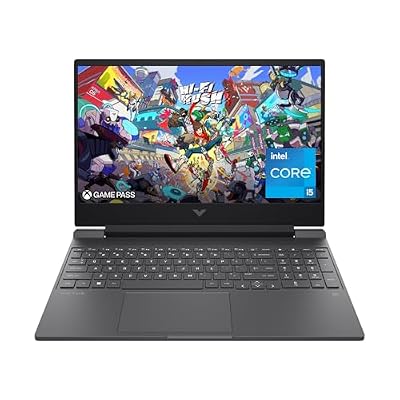
#1. HP Victus 15-fa1040nr: the supplied-memory choice
The HP's 16GB of RAM reaches the amount Epic recommends for a PC. That is a narrow, useful fact. It does not prove a chosen speed or preset will work well. The laptop pairs a Core i5-12500H with an RTX 4050 Laptop GPU. Its SSD is listed at 512GB.
Its screen is Full HD at 144Hz. HP also lists modest brightness and color coverage. Weigh the panel beyond the refresh number. The Victus 15 review gives the exact model and source limits. Check this unit first if you want the listed RAM already fitted.
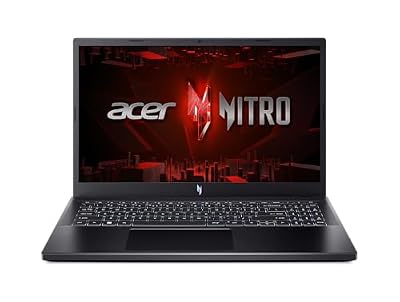
#2. Acer Nitro V ANV15-52-586Z: a 165Hz panel with a RAM limit
This Acer lists a Core i5-13420H, RTX 4050 Laptop GPU and a 165Hz Full HD IPS screen. The display can refresh at that stated rate. That does not show how many frames Fortnite will render or how the panel handles motion.
The supplied 8GB of system RAM is the main reason to pause. A stated RAM limit is not memory already fitted. If you need more RAM, check which parts fit and what the work will cost. Do not treat an unknown upgrade plan as a free route to a better result.
#3. Acer Nitro V ANV15-51-51H9: the separate 144Hz option
This Acer also lists a Core i5-13420H and RTX 4050 Laptop GPU. Its panel is listed at 144Hz. The other Acer lists 165Hz. Both have a 512GB SSD on record. They are distinct models, each with its own screen and service record.
Do not merge their best fields into one made-up Nitro V. Our ANV15-51-51H9 review keeps this unit's RAM limit clear. Its exact GPU power limit is still unknown here. Choose from the parts supplied and a test that fits how you intend to play.
Fortnite requirements: three different targets
Epic's current PC requirements give three targets. We checked them on October 17, 2026. Minimum, recommended and Epic-quality tiers answer different questions.
Requirement
Minimum
Recommended
Epic quality
System RAM
8GB
At least 16GB
At least 16GB
Graphics reference
Intel HD 4000 or Vega 8
GTX 960 or R9 280, or equivalent DX11 GPU
RTX 3070 or RX 6700 XT, or equivalent
Graphics memory
Not separately stated in this tier
2GB
At least 8GB
Storage type
Not specified in this tier
NVMe SSD
NVMe SSD
Scroll for more →
These graphics names do not turn into laptop test results. An RTX 4050 Laptop GPU is not a desktop RTX 3070. The name alone does not prove they do the same job.
Read the full list with your model's parts. The table is a place to start. It does not promise a chosen preset will run well.
Choose a mode and a play target before a laptop
Write down what you want to play and how you want it to look. Low-detail ranked play asks a different question from a preset with more effects. A change in pixel count or visual settings changes the task. The same laptop may give a different result.
Look for a current test of the exact CPU, GPU and fitted RAM. Read its pixel count and preset. Check whether it used upscaling or frame generation. Keep those settings with the result. A headline number loses meaning when it leaves out how the game ran.
A test with more RAM does not prove the base 8GB model's result. A desktop test cannot fill in a laptop's cooling and power limits either. Match the tested machine to the one in your basket. A closer match gives you more useful evidence.
Refresh rate, frame rate and online delay
The panels here are listed at 144Hz or 165Hz. Those numbers describe screen refresh, rather than game speed. They do not prove pixel response or a lack of blur. Find a panel test if clear motion is a firm need.
Your network is another part of play. A Wi-Fi or Ethernet badge does not prove the delay at home. A new laptop cannot settle the whole route to a game server. Keep network faults separate from slow local rendering when you judge a test.
Memory and background apps
Epic's RAM target shows a clear gap in the parts supplied. The HP reaches 16GB. The two Acer models start at 8GB.
That does not measure the effect of voice chat or a browser. Nor does it test recording software. It shows which unit needs no RAM change to reach this amount.
Plan for what will be open during play. If you stream too, a Fortnite-only test leaves work unmeasured. Find a test with the capture settings you plan to use. Check which apps were closed for it. Your own use may place a larger load on the system.
Best gaming laptop for Fortnite: factors to consider
Read Epic's full current requirements and choose the target tier you mean.
Match the full laptop code and selected memory option.
Find a test that names Fortnite settings and the actual laptop configuration.
Keep refresh rate separate from game and network results.
Confirm the complete purchase, including any required memory work, fits your budget.
If those checks leave the result unclear, keep it unclear. Choose after a matched test. A sales phrase cannot prove the target you want to reach.
FAQ
Is 8GB of RAM enough for Fortnite?
It reaches Epic's lowest listed RAM amount. The amount it recommends is 16GB or more. RAM alone does not prove a useful speed at your chosen settings. The Acer models here have 8GB fitted. The HP has 16GB.
Does a 165Hz screen guarantee 165 frames per second?
No. Screen refresh and rendered game frames differ. The CPU and GPU need to do the work. The panel has its own response time too. A matching test is needed for a speed claim.
Which of these configurations should I check first?
Check the HP first if you want the RAM amount Epic recommends already supplied. We have no measured Fortnite winner. Both Acer options need care around their base RAM and any planned upgrade.
Best gaming laptop for Fortnite: how we picked and verdict
We checked exact product records and the parts supplied. We then read the game's current official needs. The offer check covers a new US offer below this site's ceiling. It does not add an FPS test. We left out listings whose hardware fields conflict.
Use the main buying guide to compare the whole laptop. Send a mismatch through contact and corrections with the full model code and source URL. For the best gaming laptop for Fortnite, our verdict still depends on settings and a matching test. The HP is the clearest first check for RAM fitted.