3 Best Laptops for Casual Gaming Under 1000 in 2026
As an Amazon Associate, this website earns from qualifying purchases.
The short answer
Name the games before choosing dedicated graphics. Check the HP first when 16GB of fitted RAM suits the daily workload. Both Acer units start at 8GB, and no matching game or battery test establishes a winner.
The best laptop for casual gaming depends on the games, not just how often you play. A demanding game still asks the hardware to do the same work in a short evening session. A simple browser game can ask a different question. Start with the titles you use before deciding that you need a dedicated gaming laptop.
The three options below all list RTX 4050 Laptop graphics. The HP supplies 16GB of RAM; both Acer models supply 8GB. We would check the HP first for a mixed daily workload that needs that memory. We have no hands-on game, fan-noise or battery test for these units.
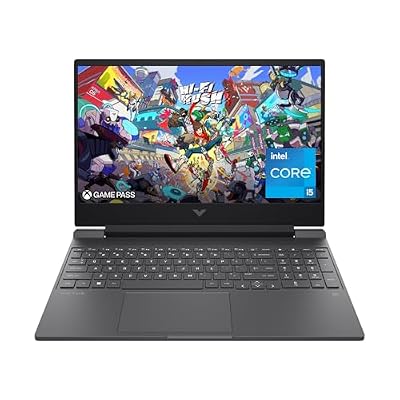
#1. HP Victus 15-fa1040nr: more RAM for daily apps
The HP lists a Core i5-12500H and RTX 4050 Laptop GPU, alongside 16GB DDR4-3200 memory. Its SSD is listed at 512GB. This is a clear setup to assess when the laptop will also handle your daily apps.
It is not proof that a casual player needs that GPU or memory amount. Check the actual games and other software first. The Victus 15 review keeps the full model and screen trade-offs visible. A gaming badge should not push carry weight or panel needs out of the decision.
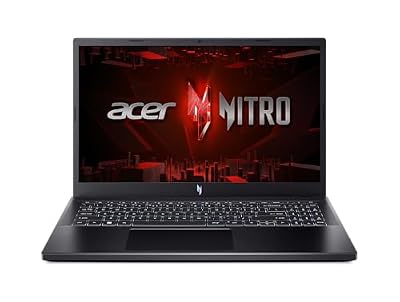
#2. Acer Nitro V ANV15-52-586Z: a high-refresh option with 8GB RAM
This Acer names a Core i5-13420H and RTX 4050 Laptop GPU. It lists 8GB DDR5 and a 512GB SSD. Its stated 165Hz panel is a reason to inspect the screen evidence, rather than a promise of game speed.
If you play lighter games, use their current requirements to judge the base RAM. If you run other apps at the same time, include their needs too. Do not assume every casual workload is small, or that a future memory upgrade is already included.
#3. Acer Nitro V ANV15-51-51H9: a separate 144Hz choice
This Nitro V lists the same CPU and GPU names as the other Acer. Its screen is specified at 144Hz, and it also has 8GB DDR5 with a 512GB SSD. Keep the full model code rather than blend the two records.
Our ANV15-51-51H9 review explains the exact setup and missing test evidence. It is a distinct configuration, not an identical product with a different refresh label. A family photo cannot settle its installed parts or service limits.
Best laptop for casual gaming: define the games first
Write a short list of the games you actually use. Note the settings you can accept and whether you will use the built-in screen. Then read each publisher's current requirements. The time you spend playing does not replace that hardware check.
What casual means to you
Useful buying question
Evidence to seek
Short sessions in a demanding game
Settings and resolution for the exact laptop
A matching game test, not only a minimum list
Browser or simple local games
Whether a dedicated GPU is needed
The game's current supported hardware and OS
Social online play
Room for the game and background apps together
Current game needs and a combined workload test where needed
Games while traveling
Runtime for the actual unplugged task
A matching battery and battery-mode test
A large library of older games
Titles that must stay installed
Current compatibility and storage needs for the games you use
Scroll for more →
An old game can still have current software or launcher requirements. A familiar title also does not prove that every mod or visual setting has the same load. Keep the exact version and the way you intend to play in your plan.
A simple game and a demanding game need different checks
The HP reaches the larger published amount as supplied. Both Acer models exceed Riot's listed amount but supply less than Epic recommends. Those are comparisons of memory capacity. They do not prove a full compatibility result or a frame rate for either game.
Check the rest of the current requirement list too. Supported Windows and graphics features can matter alongside CPU and RAM. Do not assume that meeting one easy row settles every software gate.
Integrated versus dedicated graphics
A basic laptop may be enough when the actual games support its graphics and the complete system fits the task. We have no matched integrated-graphics test here to turn into a competing recommendation. Check the game and exact laptop rather than assume all built-in graphics behave alike.
Dedicated graphics can be a useful reason to assess the selected machines when your games need that class of hardware. It does not automatically make them the better daily laptop for every casual player. Compare the full size, power needs and other features as well.
Keep laptop GPU results separate from desktop parts with similar names. A large desktop benchmark cannot establish a notebook's exact cooling and power behavior. A suitable complete-laptop test is the right evidence for the settings you want.
RAM, apps and storage
The included RAM is what arrives, rather than the largest option shown on a product page. Record that amount before comparing. If a browser or video call will stay open while you play, include those apps in the same plan.
The selected SSDs are each listed at 512GB. That is not all free space after setup. Windows and other files use part of the drive. Plan the games you will keep installed and leave room for updates, rather than count your whole online library as local storage.
If a required RAM or SSD change is part of the choice, verify the exact model's route first. A family-level slot count may include occupied slots. Add any parts and fitting work to the complete decision. Do not use an unknown upgrade to make the base laptop seem ready.
When a basic laptop may fit better
If your games run on a simpler system and the laptop is mainly for work or study, let those daily needs lead. A smaller carry kit or better-documented unplugged use may matter more than a dedicated GPU you do not need. Check the exact alternatives rather than assume this shortlist covers every kind of laptop.
We do not promise all-day use for any model here. A video-playback claim does not establish a day of calls and documents. A battery's capacity also does not tell you the runtime of your own task. Seek a matched test when that is a firm requirement.
Factors to consider
Name the games and versions you will use.
Read current requirements and choose the settings you want.
Decide whether dedicated graphics are needed for that task.
Check fitted RAM and the apps open alongside the game.
Plan storage and any verified upgrade.
Weigh the screen, carry kit and unplugged evidence against daily needs.
FAQ
Does casual gaming mean any laptop will work?
No. It describes how you play, rather than a fixed hardware load. Check the actual game and settings. A demanding title can still need capable hardware when played only occasionally.
Do I need a high-refresh screen for casual games?
Choose from the games and the rest of your work. Refresh rate is one screen fact. It does not prove game speed, low blur or good color. A larger number is not a reason to ignore a panel that fails another firm need.
Is 8GB enough for light use?
Check the games and apps you will run together. Some current game requirements are lower; others recommend more. The two Acer models supply 8GB, while the HP supplies 16GB. No single amount proves every casual workload.
Best laptop for casual gaming: how we picked and verdict
We checked exact catalog identities and new US offers below this site's ceiling. HP's model sheet supplies its fitted parts. The Acer records identify separate Nitro V configurations. We use current publisher requirements without presenting them as game tests of our own.
For the best laptop for casual gaming, start with the titles you use and the rest of your day. Check the HP first if 16GB supplied is useful to that workload. Keep each Acer's base RAM and screen record clear. Use the main buying guide for the whole system, and contact and corrections for a factual mismatch.