3 Best Gaming Laptops for Genshin Impact Cheap Under 1000 in 2026
As an Amazon Associate, this website earns from qualifying purchases.
The short answer
The HP reaches HoYoverse's recommended 16GB RAM amount as supplied. Both Acer models have 8GB. Check actual free SSD space and matching game tests before choosing settings or planning an upgrade.
Compare this exact setup if you accept its 8GB base RAM and have checked the memory needs of your chosen Genshin settings and other apps.
Core i5-13420H and RTX 4050 Laptop GPU
15.6-inch Full HD IPS screen, 165Hz
8GB DDR5 RAM; 512GB SSD
Keep in mind:It is below HoYoverse's recommended 16GB system-memory amount. Any planned upgrade must be verified and included in the complete purchase.
To play Genshin Impact for cheap, check the RAM supplied before a broad gaming label. Of these three models, the HP reaches the 16GB RAM amount HoYoverse recommends. Both Acer options have 8GB. That matches the lowest listed amount but leaves a clear limit to weigh.
We compare the parts on record with the game's current official specs. We have not played Genshin on these laptops or measured their speed. A named desktop GPU is not a test of an RTX 4050 Laptop GPU. The settings and whole system still matter.
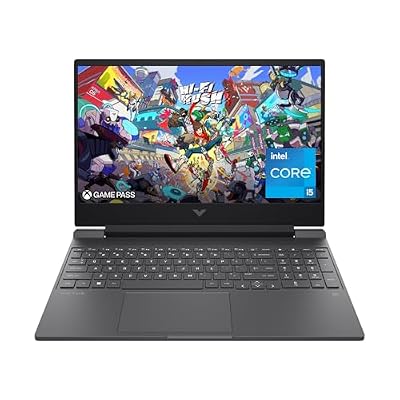
#1. HP Victus 15-fa1040nr: recommended RAM amount fitted
The HP pairs a Core i5-12500H with an RTX 4050 Laptop GPU. It has 16GB of DDR4 RAM. Its SSD is listed at 512GB. That is not all free space for games. Windows and other files share the drive.
The RAM amount is why we would check it first. We have no measured result at the highest settings. Nor have we shown a speed gain over either Acer. Read the Victus 15 review for the exact model and panel limits. A parts list is not a whole-game verdict.
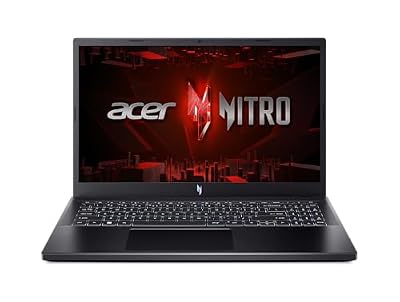
#2. Acer Nitro V ANV15-52-586Z: 8GB memory with a 165Hz screen
Compare this exact setup if you accept its 8GB base RAM and have checked the memory needs of your chosen Genshin settings and other apps.
Keep in mind: It is below HoYoverse's recommended 16GB system-memory amount. Any planned upgrade must be verified and included in the complete purchase.
This Acer lists a Core i5-13420H and RTX 4050 Laptop GPU. Its SSD is listed at 512GB. The screen is Full HD IPS at a stated 165Hz. Do not read that panel figure as a game-speed claim. It does not prove a useful Genshin mode either.
The supplied 8GB meets the lowest listed RAM amount. It is not a reason to ignore the higher target. If this laptop fits your plan only after a RAM change, check the exact service route first. A supported limit is not an included upgrade.
#3. Acer Nitro V ANV15-51-51H9: a separate base configuration
The second Acer model also lists a Core i5-13420H and RTX 4050 Laptop GPU. Its SSD is listed at 512GB. The Full HD IPS screen is listed at 144Hz. Keep its full suffix when you check the selected option at a store.
The ANV15-51-51H9 review treats this as its own laptop. It does not borrow panel or upgrade facts from the 165Hz model. Shared CPU and GPU names do not prove the same power limits. Nor do they prove the same measured game speed.
Current Genshin PC requirements
HoYoverse's official support page gives minimum and recommended PC specs. We checked it on October 17, 2026. The page was last updated November 11, 2025. Read the full current record before buying. The publisher warns that storage needs can grow.
PC requirement
Minimum
Recommended
System RAM
8GB
16GB
Free storage
At least 110GB
At least 110GB
DirectX
Version 11
Version 11
Dedicated graphics reference
GTX 1050 or equivalent
GTX 1060 6GB or better
Operating system
64-bit Windows 10
64-bit Windows 10 or 11
Scroll for more →
The official record also lists CPU needs and a minimum option for built-in graphics. None is a complete laptop test. You can check a RAM amount against another amount. Matching that row does not prove the whole model's speed or image quality.
Plan storage for the install and later updates
HoYoverse lists free space, rather than the size on an SSD's box. Each laptop here lists a 512GB SSD. Windows and recovery files use some of that drive. Other apps may use more before Genshin is installed.
List the games you will keep installed at the same time. Add your own files and media. Leave room for updates rather than filling the drive to its stated size.
A large online game library does not mean every game must stay installed. Each app has its own storage rules. Check those rules before you plan where to keep a game.
The publisher recommends an SSD install. That does not make an external drive the same as a suitable internal one. Check the game's current storage rules. Then check the connection before you build a plan around a drive you can unplug.
Resolution and visual settings are part of the decision
All three models use Full HD screens. An external display with more pixels changes the rendering task. Do not take a result from one pixel count and apply it to another.
Find a test that states the laptop, fitted RAM and game settings. Check its game version too. A test with more RAM belongs to that setup. It is not a result for the base 8GB unit. A shared GPU name cannot erase that change.
A high-refresh panel cannot force the game to produce more frames. Check the game's supported modes. Read how any test was run. We do not infer an unlocked speed target from a 144Hz or 165Hz label.
Memory: separate capacity from a promised outcome
The HP's 16GB reaches the RAM amount HoYoverse recommends. Both Acer models supply 8GB. Start with the HP if you want to meet that amount without a RAM purchase.
It does not prove a fixed gain from adding RAM. The game and background apps affect a test. Check your browser and voice chat as part of the same task. Include recording tools if you will use them.
Dedicated GPU memory stays separate from system RAM. You cannot add those two amounts to make a larger RAM total for Windows.
If you need an upgrade, check which modules are fitted and what the exact laptop supports. Check the full cost and work. Compare it with a suitable factory model. An unconfirmed RAM change is not an included benefit.
Playing Genshin Impact for cheap: factors to consider
Read HoYoverse's latest full PC requirements and storage warning.
Match the exact laptop code and selected memory option.
Plan actual free SSD space for the game and future updates.
Find a matching Genshin test with clear resolution and settings.
Check the panel beyond its refresh rate if color and brightness matter.
Confirm the complete purchase fits your budget before relying on an upgrade.
These checks separate a clear base model from a broad family name. If a listing conflicts over its GPU or RAM, resolve that before choosing it. Do not use the best parts from both versions to fill the gap.
FAQ
Can I choose an 8GB laptop for Genshin Impact?
Eight gigabytes reaches the current minimum RAM amount. HoYoverse recommends 16GB. Keep that gap in view, especially if other apps will stay open. It does not supply a measured frame-rate answer.
Is a 512GB SSD enough for the game?
The stated drive size exceeds the listed free-space need. Not all of it is free after setup. Count your other games and files. Then check free space and update needs. We do not promise a fixed number of game installs from the SSD label.
Does the RTX 4050 name guarantee high settings?
No. The laptop GPU name is one hardware fact. The whole laptop and chosen settings need a suitable test. We have no matching Genshin result here. We cannot promise the highest settings or a frame rate.
Playing Genshin Impact for cheap: how we picked and verdict
We chose exact product records and checked the parts against the publisher's current specs. Each has a new US offer below the site's ceiling. We left out records with hardware conflicts. We did not test the laptops or copy another model's result.
To play Genshin Impact for cheap, check the HP first when the stated RAM target matters. We keep the Acer choices tied to their base RAM and a plan you can verify. The main buying guide covers the whole system. Use contact and corrections to report a source or model mismatch.