3 Laptops Compared: The Best GPU for a Gaming Laptop Under 1000 in 2026
As an Amazon Associate, this website earns from qualifying purchases.
The short answer
Check the RTX 4050 options when their features fit your games, with the HP's 16GB RAM a separate reason to compare it. The RTX 2050 HP has different memory and encoder limits. No matching game test establishes a speed winner.
The best GPU for a gaming laptop depends on the whole machine and the games you want to run. This shortlist compares three laptops with two different GPU models. The Intel HP and Acer name RTX 4050 Laptop graphics. The Ryzen HP uses an RTX 2050 Laptop GPU. That choice also changes the CPU and fitted RAM.
Start with the Intel HP if you want its RTX 4050 alongside 16GB of fitted RAM. Assess the Acer with its 8GB RAM limit in view. The Ryzen HP is a separate CPU-and-GPU package with 4GB of graphics memory. We have not tested game speed on these units, so the order is a parts-based starting point.
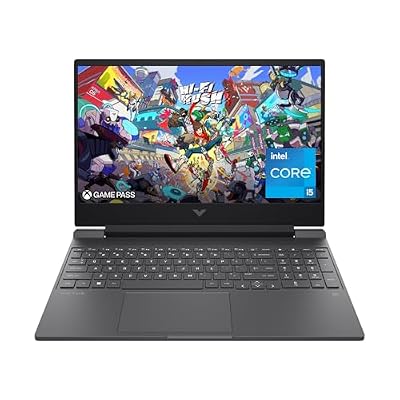
#1. HP Victus 15-fa1040nr: RTX 4050 with more system RAM
HP's exact model sheet gives this unit an RTX 4050 Laptop GPU with 6GB of dedicated GDDR6 memory. It also lists a Core i5-12500H and 16GB of DDR4 system RAM. These are two separate kinds of memory. The graphics memory cannot be added to the RAM total available to Windows apps.
The supplied 16GB is the whole-system reason to check this model first. It is not proof of a fixed gain over the Acer in every game. The screen is listed at Full HD and 144Hz, with 250 nits and 45% NTSC. A graphics choice still needs a panel that suits the rest of your work.
Read the Victus 15 review for the complete model code and source limits. Exact GPU power and a matched gaming result are not established here. Keep those fields unknown rather than borrow them from another Victus.
#2. Acer Nitro V ANV15-52-586Z: RTX 4050 with a RAM trade-off
The Acer lists an RTX 4050 Laptop GPU with a Core i5-13420H. Its system RAM is 8GB DDR5, and storage is a 512GB SSD. Its screen is specified at 165Hz Full HD IPS. The larger refresh number does not establish a gaming advantage over the HP's panel.
The GPU name is shared, but the whole systems differ. The processor and fitted RAM change. The laptops may use different cooling and power rules too. Without a matched test, we cannot declare the two RTX 4050 units equally fast or rank a measured gap between them.
Keep the full ANV15-52-586Z suffix. A 144Hz Nitro V with a different model code has its own record. If you need more memory, verify the exact model's service route and complete cost before choosing. A graphics badge cannot make that required work disappear.
#3. HP Victus 15-fb1013dx: a different GPU and CPU package
HP's 15-fb1013dx sheet lists an RTX 2050 Laptop GPU with 4GB GDDR6. The CPU is a Ryzen 5 7535HS. Factory RAM is one 8GB DDR5-4800 module, with two accessible memory slots listed. These facts define this option rather than every Ryzen Victus.
The GPU and its memory are a real change from the two RTX 4050 models. Do not choose from the CPU name alone and overlook that graphics difference. Check the game's current requirements and a suitable test before deciding whether this complete package fits your target.
The screen is listed at Full HD and 144Hz. As with the other units, that does not prove a matching frame rate. We have no game or noise test for it. A matched unplugged result is missing too.
Best GPU for a gaming laptop: retain the exact record
Use the full mobile GPU name. NVIDIA's laptop comparison lists the RTX 4050 Laptop GPU with 6GB GDDR6. HP's model sheets give the fitted GPU and memory for each Victus. None of these sources is our own laptop benchmark.
Laptop
GPU record
System RAM supplied
Important unresolved result
Victus 15-fa1040nr
RTX 4050 Laptop GPU; HP lists 6GB GDDR6
16GB DDR4
Exact-unit game speed and GPU power limit
Nitro V ANV15-52-586Z
RTX 4050 Laptop GPU; NVIDIA's standard memory is 6GB
8GB DDR5
Exact-unit game speed, panel response and GPU power limit
Victus 15-fb1013dx
RTX 2050 Laptop GPU; HP lists 4GB GDDR6
8GB DDR5
Exact-unit game speed and GPU power limit
Scroll for more →
The table shows three configurations, not three different GPU chips. It also keeps graphics memory separate from system RAM. A larger total made by adding those columns together would be misleading.
Laptop and desktop GPUs need different evidence
A desktop graphics card with a similar number is not a tested substitute for the laptop part. Mobile and desktop products can use different limits and designs. Keep the word Laptop where the maker uses it. Dropping that word can change what a search result or benchmark refers to.
A standalone GPU chart can still provide context, but read how its results were obtained. A complete laptop test names the host system and cooling setup. Its operating mode matters too. Without those fields, the chart cannot establish the behavior of the exact laptop in your basket.
The same caution applies within a GPU family. Do not transfer every family-level feature to a specific chip without checking it. A similar series number is not a complete technical record. Exact product names matter for software features as well as game tests.
Graphics memory: capacity is one constraint
Dedicated graphics memory stores data the GPU needs. Its amount matters to the settings and workloads you should investigate. It does not by itself rank the whole GPU. A chip with more memory is not automatically faster in every task than one with less.
The HP sheets make the amount clear here: 6GB for the RTX 4050 model and 4GB for the RTX 2050 model. Read your game's current memory requirements and the conditions of a matching test. Do not assume a minimum requirement promises the quality preset you want.
Texture settings can be part of that decision. A test that lowers them to fit a smaller memory budget is a different test from one using a higher texture preset. Keep that setting visible when comparing results. The same average frame rate can be less useful if the image settings differ.
Avoid a universal claim that one memory amount is enough for every game at Full HD. Games and their updates differ. Work apps can have their own needs too. Use current requirements and measured evidence for the task, rather than turn a single number into a lifetime promise.
System RAM still belongs beside the GPU
The Intel HP supplies 16GB of RAM. The Acer and Ryzen HP supply 8GB. A game can use system memory as well as graphics memory, and other apps share the system RAM. The GPU's dedicated memory does not enlarge the amount available to all those apps.
Keep fitted RAM with any benchmark you read. A result from a laptop upgraded to more memory belongs to that tested setup. It is not a result for the base option just because the GPU matches. An unmentioned RAM change can make two product pages look more alike than they are.
Plan required upgrades before choosing. Check the exact service record, the modules fitted and the full cost of the work. A CPU's memory limit does not settle the laptop's support. Our Victus RAM guide shows how to keep those source types separate.
GPU power: a range is not the retail laptop's setting
NVIDIA lists a GPU subsystem power range for the RTX 4050 Laptop GPU. That chip-level range is not the confirmed setting of either selected laptop. The exact laptop maker's specification or a matched test is needed to resolve that field. We leave it unknown here.
Do not use adapter wattage as the GPU limit. The adapter powers the whole system and supports charging under its own conditions. A number on the power brick does not tell you how much the GPU uses in a particular game.
Likewise, a maximum boost allowance is not sustained power through every task. Read whether a maker's figure includes a boost mode and what conditions it requires. Keep the definition with the number. Do not silently compare a maximum from one record with a sustained figure from another.
A wattage ratio is not a frame-rate ratio. Different workloads can respond differently to a power change. The rest of the laptop can also limit the result. Without matching tests, a larger figure cannot justify a calculated speed gain.
For a buyer, the useful question is whether the documented mode and tested result meet the actual need. A model should not depend on an unverified tuning change to fit the reason for buying it. Keep altered limits separate from a stock retail result.
Cooling and noise: seek the tested mode
A fan count describes part of a cooling design. It does not measure surface heat, fan noise or sustained game speed. Those results need a test of the exact laptop. A family-level cooling slogan cannot fill the gap.
Read the power mode in a review. A maximum-fan run and a quiet-mode run answer different questions. If noise matters to your desk or shared room, seek a result in the mode you expect to use. The highest performance number alone may not describe that use.
Keep temperature measurements distinct as well. A processor sensor and a warm spot on the case are not the same thing. Room conditions and workload duration matter. Do not blend them into a single claim about comfort or reliability.
Native rendering versus upscaling or generated frames
NVIDIA's DLSS description separates its rendering features. Super Resolution builds a higher-resolution output from a lower-resolution input. Frame Generation creates additional frames. These are different settings from a native rendering test.
Feature support must also match the game and GPU. The RTX 4050 record lists DLSS Super Resolution and Frame Generation capability. That does not mean every game offers each feature, or that every setting produces the same result. Check the current game support and test method.
When reading a benchmark, keep these settings beside the number. A generated-frame count should not be presented as an unlabeled native result. It also does not replace a latency or image-quality test. A higher displayed frame count answers only part of the play experience.
You do not need to reject a useful rendering feature to compare honestly. You need to compare like with like. Read the visual result and response evidence that matter to you. Do not choose a laptop from a large number whose rendering mode is missing.
AI figures in a graphics listing
NVIDIA's RTX 4050 Laptop record includes an AI TOPS figure. That is not a frame-rate measure. It cannot be read as the number of frames a game renders each second. Keep the units and named task with any number you use to compare hardware.
A broad AI label also does not establish that your chosen app will use a feature. The software needs a supported path for the task. A game-rendering feature and a local work app may use the GPU in different ways. Check what the app actually supports before buying for that label.
For a useful work result, name the app version and the task being timed. Retain the input size and settings where the source gives them. A throughput figure for a chip does not measure how long a complete laptop takes to finish your project.
The same care applies to a processor's separate AI hardware. Its presence does not enlarge the GPU's dedicated memory. It does not establish a game-speed gain either. Choose from the exact app need and a matched test, rather than add unlike scores into one invented laptop rating.
The CPU can change what a GPU test means
A graphics test still runs within a complete system. The two RTX 4050 units here have different CPUs and fitted RAM. The RTX 2050 unit changes both as well. That is why this shortlist cannot act as a controlled test of one GPU against another.
Read what limits the workload you care about. A low-detail competitive setup can ask different questions from a visually demanding preset. A high graphics score in another task does not establish the CPU behavior of the laptop you want. Keep both chips with the measured result.
The GPU name is a useful search term, but add the full laptop code to your research. A review with the right graphics badge and a different CPU may still be useful for some questions. It needs a clear limit when used to discuss the whole configuration.
Display refresh and GPU frames are separate
The Intel HP and Ryzen HP list 144Hz panels. The Acer lists 165Hz. These are screen refresh figures. They do not establish the number of new game frames the GPU produces each second, nor do they prove how quickly a pixel changes.
A high-refresh label also does not prove good brightness or color coverage. HP states 250 nits and 45% NTSC for the two exact Victus model sheets. A buyer who edits visual work should keep those limits beside the graphics choice. A GPU cannot make a narrow-color panel into a measured wide-color display.
If an external screen will do that work, confirm the full video route. The GPU maker's output support does not prove the port implementation on every laptop. Check the path from the laptop output through your cable and dock to the display. It must support the mode you want.
Choose resolution and settings before reading a chart
Full HD on the built-in screen is a different rendering task from a higher-resolution external monitor. A test at one pixel count does not prove a result at another. Keep the output resolution and any internal rendering scale visible.
Graphics presets also bundle several choices. Two sources can use the same broad label while changing individual options. Read the test details where they are available. A large texture or lighting change can make results less comparable even when both say high settings.
Ray tracing is another setting to retain. Its presence in a feature list does not mean every game or preset is a suitable target. Seek the result with the effect enabled if that is how you want to play. Do not transfer a test with the feature off into a claim about it being on.
Choose a target you can describe before choosing a winner. That might be one game at a named preset, or several games with flexible settings. Those are different needs. A single unlabeled score should not silently stand in for both.
Read average and low-frame results with their method
An average frame rate summarizes a test run. It does not describe every moment in play. Low-frame measures and frame-time plots can add context, but their methods also need to match. Different sources may not calculate a low measure in the same way.
Check whether the game build and test route are current enough for your decision. A scripted run, a built-in benchmark and a live match are different workloads. Each can be useful when labeled. A result should not lose its method when it becomes a buying claim.
If a review reports only one short run, do not turn it into a sustained result for a long session. Likewise, a result from one power mode does not describe every mode. Read the duration and conditions before drawing a wider conclusion.
We have no matched set of measurements for these three exact retail setups. We therefore publish no invented average, low-frame figure or relative speed percentage. The source records identify what to test next. They do not supply the missing measurements.
Media encoding: a separate GPU feature check
NVIDIA's encode/decode matrix identifies the exact RTX 2050 as Ampere with a seventh-generation encoder. It lists the RTX 4050 Laptop as Ada Lovelace with an eighth-generation encoder. The matrix gives AV1 hardware encoding to the RTX 4050 Laptop, but not the RTX 2050.
That is a useful distinction if a recording workflow specifically needs AV1 encoding. It does not guarantee that every app or service accepts that format. Check the capture software, chosen codec and destination before making it a purchase reason.
Encoding and decoding are different tasks. A GPU that can play a video format has not automatically proved it can encode that format in hardware. Use the correct half of the matrix. Keep that distinction when reading a broad video-capability label.
A dedicated encoder is also not proof that streaming adds no load. The game and capture software still have work to do. OBS's performance guide explains that scene rendering uses GPU resources. A combined game-and-stream test is needed for an outcome claim.
Editing and other work need the app's own requirements
A gaming GPU can be relevant to creative software, but the app and media decide the useful features. Check current system requirements and supported hardware paths. A GPU family name does not establish each codec and effect. Check required professional features in the actual app too.
For example, Adobe's current Premiere requirements recommend 8GB of GPU memory. The selected HP RTX 4050 has 6GB and the RTX 2050 has 4GB. Neither meets that recommended amount. That does not replace the rest of Adobe's requirements or test a specific project.
The panel is another separate limit for visual work. If color accuracy matters, find matching display evidence or plan a verified external display. A GPU feature does not prove the built-in screen shows the colors the project needs.
Battery mode is not the plugged-in result
A laptop can change power behavior when it leaves the adapter. A plugged-in benchmark does not establish battery-mode game speed. It also does not tell you how long a gaming session will last. Those need their own test of the exact unit.
Battery capacity is stored energy, rather than hours. The screen and other parts share it with the GPU and CPU. Software and brightness affect the workload too. Do not calculate a runtime promise from the GPU badge or battery size alone.
If long use away from power is a firm need, seek a test that matches the task. Video playback, browser work and gaming are different loads. A result for one should not be repeated as a promise for another. None of these shortlisted models has an unplugged result from us.
Ports, docks and external monitors
Read the laptop maker's port list before planning a display around the GPU. HP's 15-fa1040nr sheet lists HDMI 2.1 and USB-C with DisplayPort 1.4 at a 5Gbps data rate. That is not proof of Thunderbolt or every high-resolution mode through a dock.
Include the cable and monitor input in the check. A port-standard name alone does not settle the complete link. If an adapter is needed, its supported mode matters too. Ask about the whole route rather than just whether the laptop has USB-C.
We have not confirmed a named dock for these exact setups. Do not treat an accessory photo or a broad compatibility claim as the missing evidence. Confirm the model and intended mode before buying the accessory alongside the laptop.
Buy the GPU you need in the complete laptop
Do not choose a laptop on the assumption that its internal GPU can be upgraded like a desktop card. An exact service record is needed before relying on any such change. A removable SSD or RAM module does not imply a removable graphics card.
Plan the fixed parts for the intended life of the purchase. You can choose a more suitable factory configuration if the GPU or its memory is wrong for a required app. Do not use an unknown future upgrade to make an unsuitable base model appear to fit today.
For RAM and storage changes, verify the actual route separately. Add parts and fitting work to the complete decision. The cheapest starting setup is not automatically the lowest-cost finished system. This guide shows no offer amount and makes no forecast about future prices.
Factors to consider when choosing laptop graphics
Name your games and settings, then the screen resolution you intend to use.
Retain the exact Laptop GPU name and full retail model code.
Check dedicated graphics memory separately from system RAM.
Keep exact-unit power limits unknown unless a matching source establishes them.
Find a whole-laptop test with clear rendering settings and power mode.
Read panel evidence as well as the GPU specification.
Check app-specific codec or GPU features where they matter to work.
Verify the complete purchase and required changes fit the budget.
This order makes missing facts visible before a purchase link becomes the next step. A missing result is not proof of poor hardware. It is a limit on the recommendation we can make. Choose with that limit in view.
FAQ
Is the laptop GPU the same as a desktop GPU with a similar name?
Do not assume it is. Retain the mobile product name and read its own specifications. A desktop benchmark does not establish a laptop's power or cooling behavior. Nor does it prove the game result. Seek a matching laptop test for that claim.
Does more graphics memory always mean more game speed?
No. The amount is one constraint to compare with the task. The GPU design, whole system and settings still matter. More memory alone does not rank two different chips across every game or app.
Are the two RTX 4050 laptops equally fast?
We have not established that. Their CPUs and fitted RAM differ, and exact power and cooling behavior need separate evidence. A shared GPU name does not supply a matched whole-system result.
Does hardware AV1 encoding mean I can use it for every stream?
No. The software and destination need to support the format too. NVIDIA's hardware matrix answers a capability question. It does not test the complete stream or guarantee that the service accepts the chosen settings.
Best GPU for a gaming laptop: how we picked and verdict
We checked exact product records and new US offers below the site's ceiling. HP's 15-fa1040nr sheet and 15-fb1013dx sheet identify its two GPU configurations. The Acer catalog identifies ANV15-52-586Z. NVIDIA's exact GPU and media records support the feature distinctions. We checked these sources on October 17, 2026.
For the best GPU for a gaming laptop, start with the game and the whole system. Check the Intel HP first when its RTX 4050 and 16GB of supplied RAM fit your needs. Keep the Acer's 8GB limit visible, and assess the Ryzen HP with its separate RTX 2050 and 4GB graphics memory. We have no measured universal winner. The main buying guide covers the broader choice; use contact and corrections for a factual mismatch.