3 Laptops Compared: Best Time to Buy a Gaming Laptop Under 1000 in 2026
As an Amazon Associate, this website earns from qualifying purchases.
The short answer
Buy when an exact eligible configuration meets a firm need and its limits are clear. No retained price history establishes a cheapest month. Compare fitted parts and any required upgrade before choosing a date.
The best time to buy a gaming laptop is when a clear configuration meets your needs and you have time to set it up and check it. A sale date alone cannot tell you that. We have no price-history series here that proves a cheapest month or a future discount. This page gives a buy-or-wait method and three exact models to assess when you are ready.
The HP is our first check if you need 16GB of RAM already fitted. The two Acer models have 8GB and different panel refresh rates. We compare those facts without showing prices, predicting deals or claiming to have tested the laptops.
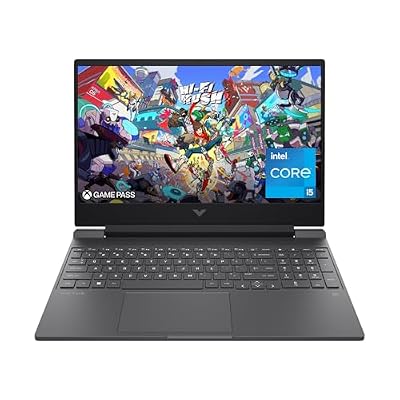
#1. HP Victus 15-fa1040nr: check the ready configuration
The HP lists a Core i5-12500H, an RTX 4050 Laptop GPU and 16GB of DDR4 RAM. Its SSD is listed at 512GB. Those fitted parts are the unit to compare, rather than the lowest starting option shown elsewhere in the same family.
The Victus 15 review explains its exact product number and panel limits. If those limits rule it out, waiting for a banner does not fix the mismatch. Choose from the model that will arrive and the work it needs to do.
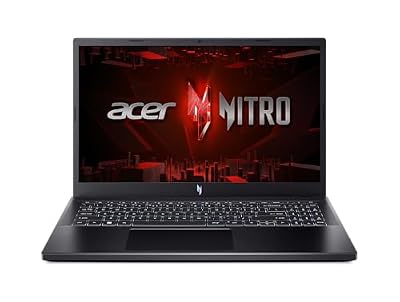
#2. Acer Nitro V ANV15-52-586Z: settle the RAM plan first
This Acer lists a Core i5-13420H, RTX 4050 Laptop GPU, 8GB DDR5 and a 512GB SSD. A larger supported RAM figure is not the amount in the selected base model. Resolve a required change before treating the laptop as ready for your task.
Keep ANV15-52-586Z in your notes. A store may show several memory or panel options on one page. A change to the selected variation can matter more to fit than a change in the promotion around it.
#3. Acer Nitro V ANV15-51-51H9: compare the exact alternative
This Acer lists the same CPU and GPU names as the other Nitro V, with a 144Hz Full HD IPS screen. Its listed RAM is 8GB and SSD is 512GB. It is a distinct setup to compare, rather than an identical offer with a shorter title.
Our ANV15-51-51H9 review keeps that model's limits clear. Do not borrow the other Acer's panel or memory record. A fair timing decision starts with an honest match between the products.
Best time to buy a gaming laptop: buy or wait
Use the reason for the purchase to set the timing. A laptop needed for a fixed course or job start has a different deadline from an optional replacement. Include setup and a practical check period in that plan. Read the actual seller's return terms rather than assume every store gives the same window.
Situation
Useful next step
What still needs evidence
Your current device cannot do required work
Find a suitable exact model and leave time for setup
The new laptop's app fit and delivery terms
Your current device still meets the task
Wait until a candidate improves a need you can name
A real benefit beyond a promotion label
A candidate needs RAM or storage work
Verify the complete change before choosing
Parts, service route and total cost
A listing has conflicting hardware fields
Resolve the conflict before paying
The actual configuration that will arrive
A new generation has been announced
Compare the complete available systems
A launch announcement is not a result for every model
Scroll for more →
There is no universal date in that table. The point is to avoid making a deadline or a missing requirement invisible. A hoped-for discount does not solve a laptop that is unsuitable for the task.
Compare identical configurations before a promotion
Retain the full factory model, processor and GPU. Record the fitted RAM and SSD too. A family-level starting offer can use a different panel or smaller memory amount. It is not a valid like-for-like comparison with the model you chose.
Do not compare a new unit with a refurbished or open-box one as though condition were unchanged. This site's qualifying picks use new US offers. A different condition can have different support and return terms. Read the actual option and seller before making the comparison.
Seller-upgraded bundles also need their own record. More RAM fitted by a seller may differ from the factory setup. Check who did the work and which terms cover it. Do not transfer a factory configuration's evidence to a modified bundle without checking the change.
What a promotion does not prove
A promotion does not prove the laptop has a better screen or stronger cooling. A processor tier does not become a test result because it is printed beside a banner. Keep the parts and evidence separate from the way the offer is presented.
The same is true of old and new generation labels. An older chip can remain in a current listing. A recent listing date does not redesign the laptop. The date of this guide is a source-check date, rather than a claim that the hardware was launched this year.
We do not predict which model will fall in price or how long stock will last. We do not use a past offer to keep an over-ceiling product in the current picks. The exact qualifying offer must still pass the site's rule when it is checked.
Return terms and setup time
Read the seller's current policy for the exact item. Check when the return period begins and which steps it requires. Do not assume a manufacturer warranty gives the same remedy as a store return. The terms need their own source at purchase time.
Leave time to confirm what arrived. Match the model and fitted parts to your order. Install the apps you need and check your own devices within the seller's process. A tight deadline can make a normal setup issue much harder to resolve before the laptop is needed.
For a course or employer, check the required software first. A gaming label does not establish a supported OS edition, device policy or specialist app. Resolve those needs before choosing the day to order.
Factors to consider before ordering
Name the task and the date you need a working laptop.
Match the full model code and selected option.
Check all required apps and devices.
Confirm any upgrade route and complete cost.
Read delivery, return and support terms for the actual seller.
Recheck the exact new offer against your budget.
If the laptop fits and the timing leaves room for setup, a calendar label is not required to make it a sensible choice. If a key fact is missing, resolve that first. Waiting is useful when it gives you better evidence or a better-fitting option, not merely a larger banner.
FAQ
Is there one cheapest month for gaming laptops?
We have no retained price-history evidence that proves one here. Promotions differ by model and seller. Compare the exact fitted configuration and current terms rather than assume a named event produces the best complete purchase.
Should I wait for the next CPU or GPU generation?
Compare the actual systems and the date you need one. An announcement does not establish the price, stock or measured benefit of every future laptop. If your current device meets the task, you have time to read better evidence. If it does not, leave time to choose and set up a suitable available model.
Does an eligible laptop keep its place after its offer changes?
An over-ceiling product leaves the qualifying picks. A past check cannot justify a current budget claim once the evidence is stale or the source fails. Hardware guidance and current offer qualification remain separate.
Best time to buy a gaming laptop: how we picked and verdict
We chose clear catalog identities and checked new US offers below this site's ceiling. HP's 15-fa1040nr sheet supplies its exact factory details. The two Acer records identify separate Nitro V models. We do not have a price-history study or hands-on test to turn into a calendar or speed claim.
The best time to buy a gaming laptop is when a verified model fits your work and the timing leaves room to check it. Start with the HP if its 16GB of supplied RAM meets a firm need. Weigh each Acer's base RAM and panel separately. Use the main buying guide for the whole-laptop decision and contact and corrections for a source mismatch.